How to write bug reports an AI coding agent can fix
AI coding agents are good at making targeted code changes when the task is clear. They struggle when a bug report says only that a page is broken, slow, or weird. A useful report gives the agent enough evidence to reproduce the problem, locate the likely code path, and decide what to change.

- Start with the job the report must do
- Describe the visible problem without guessing too early
- Give reproduction steps that match the user journey
- Attach the browser evidence agents need
- Turn the report into an agent-ready prompt
- Write acceptance criteria that prevent fake fixes
- Use a consistent template for every report
Start with the job the report must do
A bug report for a human teammate can rely on shared product knowledge. A bug report for an AI coding agent cannot. The agent needs a compact package of facts: what the user did, what happened, what should have happened, where it happened, and what technical evidence was present at the time.
Think of the report as a handoff from the browser to the codebase. The agent is not just reading your complaint. It is trying to form a hypothesis, search the repository, edit files, and run tests. If your report skips the UI location or hides the error message, the agent may choose the wrong component or patch a symptom instead of the cause.
A good test is simple: could someone who has never seen the bug open the same screen, trigger the same behavior, and know what evidence to inspect first? If the answer is no, add context before you ask an agent to fix it.
- Bad: Checkout is broken.
- Better: On /checkout, clicking Apply after entering SAVE10 leaves the button in a loading state and shows no discount. Expected: the order summary updates or an error message appears.
- Best: Include the exact element clicked, the input value, the visible result, the console error, and the failed network request.
Describe the visible problem without guessing too early
The first part of the report should be observable. Avoid starting with a theory such as the React state is stale or the API is down unless you have evidence. The agent may anchor on that theory and miss the real issue. Start with what happened in the product.
Name the page, the state of the user, the element involved, and the expected result. If the bug is visual, describe the layout issue in relation to nearby elements. If it is behavioral, describe the exact action and response. If it is data-related, include the values used, with private data removed.
This is especially important for UI bugs. Saying the card looks wrong is not enough. Saying the pricing card on the annual plan page overlaps the primary CTA at 1366px wide gives the agent a specific place to inspect and a condition to test.
- Page or route: /settings/billing, /product/123, or the dashboard home page.
- User state: logged out, trial user, admin, empty workspace, customer with saved payment method.
- Element: Save button, email input, plan selector, modal close icon, mobile navigation.
- Observed result: spinner never stops, modal closes without saving, text overflows, request returns 500.
- Expected result: settings save and toast appears, modal remains open with validation, layout wraps cleanly.
Give reproduction steps that match the user journey
Reproduction steps are not a formality. They are the shortest path from a clean browser state to the failure. For an AI coding agent, they also define the acceptance path for the fix. If the steps are vague, the agent has to invent a path, and that can lead to a fix for a different bug.
Write steps as actions, not conclusions. Use the real labels on buttons and fields. Include the data that matters, such as a coupon code, search term, file type, or viewport size. If the bug does not happen every time, say how often you saw it and what seems to affect it.
Keep the steps minimal, but do not remove setup details that control the bug. For example, if the error only happens for a user with no projects, that is not background information. It is part of the reproduction.
- 1. Log in as a workspace admin with no existing API keys.
- 2. Go to Settings, then API keys.
- 3. Click Create key.
- 4. Enter a name with 40 or more characters.
- 5. Click Save.
- 6. Result: the modal closes, no key appears, and the console logs a validation error.
- 7. Expected: the modal shows a validation message or the key is created.
Attach the browser evidence agents need
Many bug reports fail because they describe the surface but omit the evidence underneath it. Console errors, network responses, selected DOM elements, and screenshots often tell the agent where to start. Without them, the agent may search by label text and guess across several unrelated files.
For example, a checkout button that never finishes loading could be caused by a disabled state bug, a rejected promise without error handling, a 401 from the coupons API, or a missing field in the response shape. The visible symptom is the same. The console and network context separate these cases.
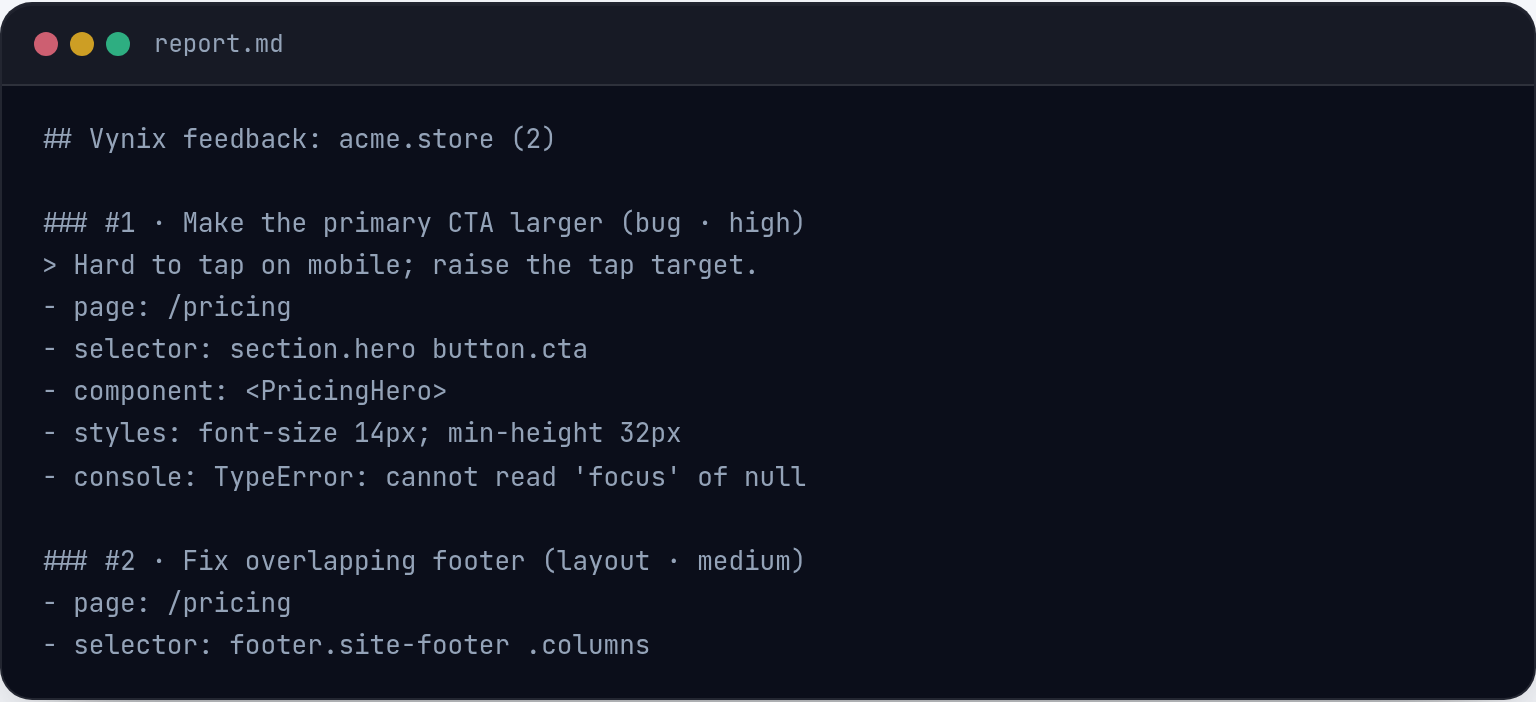
This is where a website annotation tool like Vynix helps. You drop a lightweight widget on the site, click on what is wrong, and Vynix captures the selected element, a screenshot, console context, network context, and an AI diagnosis of the likely root cause. That gives the report the browser-side facts an agent needs before it touches the code.
You should still review the captured context before sending it. Remove secrets, tokens, personal data, or anything not needed to fix the issue. The goal is not to dump every browser event into a ticket. The goal is to include the evidence that makes the failure clear.
- Screenshot: shows the exact UI state and selected area.
- Element context: helps identify the component, selector, text, and state involved.
- Console context: captures errors, warnings, stack traces, and failed assumptions in client code.
- Network context: shows failed requests, status codes, request timing, and response shapes.
- AI diagnosis: gives a starting hypothesis, not a final truth. Treat it as evidence to verify.
Turn the report into an agent-ready prompt
Once the evidence is gathered, the next step is to write the instruction so the coding agent can act. A strong prompt is specific about the bug, but it does not over-prescribe the implementation. Tell the agent what to investigate, what behavior to preserve, and how to verify the fix.
Avoid asking for broad cleanup while fixing a small bug. If the report says fix the billing save bug and refactor the settings page, the agent may change too much and make review harder. Narrow tasks are easier to test, review, and revert.
A useful agent prompt often has five parts: summary, reproduction steps, observed evidence, expected behavior, and validation. Vynix can help with this handoff because from the captured issue you can copy a ready-to-build prompt or open a GitHub issue and assign it to a coding agent.
- Summary: Billing settings fail to save when the tax ID field is empty.
- Reproduction: Include the route, user state, exact clicks, and input values.
- Evidence: Include the selected element, screenshot, console error, and relevant failed request.
- Expected behavior: Save succeeds when optional tax ID is blank, or the UI shows a clear validation error if it is required.
- Constraints: Do not change unrelated billing fields or the checkout flow.
- Validation: Add or update a test, then confirm the reproduction steps pass.
Write acceptance criteria that prevent fake fixes
AI coding agents can produce changes that look plausible but do not actually fix the reported path. Acceptance criteria reduce that risk. They describe the behavior that must be true after the change, not the code you hope the agent writes.
Good acceptance criteria are concrete and testable. Instead of the UI should work better, write the Save button should stop loading within one second after a successful response, the updated value should appear after refresh, and an error message should appear for a 400 response. If the bug involves responsive layout, include the viewport or device condition.
You can also tell the agent what not to break. If a shared component is involved, list the known places it appears. If the network request has multiple error states, mention which states already work. This keeps the fix focused and lowers the chance of a regression.
- The original reproduction steps no longer produce the bug.
- The expected UI state is visible after the action completes.
- Known error states still show the existing messages.
- No unrelated routes, labels, or API contracts are changed.
- A test or manual verification note is included with the change.
Use a consistent template for every report
Consistency matters when bug reports become work for agents. A stable format helps the agent find the important facts and helps reviewers compare the fix against the original issue. It also saves time for the person reporting the bug because they do not have to decide what to include each time.
Here is a practical template you can use in a GitHub issue or agent prompt: title, environment, user state, reproduction steps, observed result, expected result, captured evidence, likely root cause, constraints, and validation. The likely root cause can come from your own investigation or from a tool like Vynix, but it should be framed as a hypothesis.
The best reports are not long for the sake of being long. They are complete in the places that matter. If the bug is a missing label, the report can be short. If the bug involves a failed request, user permissions, and a stale UI state, the report needs enough detail to connect those pieces.
When you click the broken part of a page with Vynix, you can package much of that context at the moment the bug is visible. That is often the difference between an agent making a targeted fix and an agent spending its first attempt trying to understand what the report meant.
- An AI-fixable bug report must include the user action, visible result, expected behavior, and enough browser evidence to locate the likely code path.
- Console, network, screenshot, and element context are often the difference between a targeted fix and a guessed patch.
- Use a repeatable template with reproduction steps, evidence, constraints, and validation so the agent can fix the bug and reviewers can confirm it.
Frequently asked questions
Should I include an AI diagnosis in the bug report?
Yes, if you treat it as a starting point. Include the diagnosis along with the evidence that supports it, such as console errors or failed requests. Do not present it as guaranteed truth.
How much context is too much for an AI coding agent?
Include context that helps reproduce, locate, or verify the bug. Omit unrelated logs, private data, and broad product history. A focused screenshot, selected element, console error, and relevant network request are usually more useful than a large dump of raw data.
Can Vynix create a GitHub issue from a captured bug?
Yes. From a captured issue in Vynix, you can copy a ready-to-build prompt or open a GitHub issue and assign it to a coding agent.
Install the widget with one script tag, point at a bug, and hand the fix to your coding agent.
Get started free