Bugsnag vs Vynix
Updated
Bugsnag and Vynix solve different parts of the software quality workflow. Bugsnag is an error monitoring product built to detect crashes and exceptions, group them, and show release stability across web, mobile, and backend apps. Vynix is a website annotation and developer-context tool built for reporting what a person sees on a live page, then packaging the surrounding context for a developer or coding agent. The real choice is whether the team needs production stability monitoring at scale, visual issue capture with implementation context, or both.
At a glance
| Capability | Vynix | Bugsnag | Notes |
|---|---|---|---|
| Runtime error and crash monitoring | Partial | Yes | Bugsnag continuously captures crashes and exceptions through SDKs. Vynix captures console and network context when someone annotates an issue, but it is not a full error monitoring platform. |
| Click-to-annotate visual feedback | Yes | No | Vynix is built around clicking a page element and capturing the visual issue. Bugsnag reports automated errors rather than human annotations on a live page. |
| Automatic developer context | Yes | Partial | Vynix captures the selected element, screenshot, console, and network context for a reported page issue. Bugsnag captures diagnostics such as stack traces, breadcrumbs, metadata, and environment details for reported errors. |
| AI root-cause diagnosis | Yes | Partial | Bugsnag (now part of SmartBear's Insight Hub) ships an MCP server that pushes error data into a coding agent for fix suggestions, so it isn't without AI. It stops short of diagnosing a visual issue you point at, which is what Vynix does (checked July 2026, per bugsnag.com/product). |
| Release health and stability score | No | Yes | Bugsnag tracks sessions and stability score to help teams judge release health. Vynix is focused on annotated website feedback and handoff, not release stability metrics. |
| Console and network context for a page issue | Yes | Partial | Bugsnag's browser SDK records breadcrumbs, including console logs and HTTP requests, but as the trail leading up to a caught exception rather than context for an issue a reviewer flags by hand (checked July 2026, per docs.bugsnag.com/platforms/javascript). |
| GitHub issue or coding-agent handoff | Yes | Partial | Bugsnag has a GitHub integration and its MCP server carries error data into an IDE or agent. The handoff exists, it's just less turnkey than a ready-to-paste prompt written from a page report (checked July 2026, per bugsnag.com/product). |
| Review rounds, projects, roles, and sharing | Yes | Partial | Vynix includes collaboration features for website review and shared feedback. Bugsnag supports projects and team workflows for error triage, but not review rounds for visual page annotations. |
What Bugsnag does well
Bugsnag is strongest when the problem is automated error detection. Its SDKs report unhandled and handled errors, attach diagnostics such as stack traces and device or browser information, and group related errors so teams can see which failures are affecting users. It is widely used for web, mobile, and backend applications where teams need ongoing visibility into crashes and regressions.
A major Bugsnag feature is release health. Bugsnag tracks sessions and calculates a stability score, which helps teams decide whether a release is healthy enough to continue rolling out or ship more broadly. That makes it useful for engineering organizations that care about crash-free sessions, affected users, and whether a new release introduced a measurable stability problem.
Bugsnag is not primarily a visual feedback tool. It can tell you that an exception occurred, show where it happened in code, and provide runtime metadata, but it does not start from a human clicking a broken element on a live page and explaining the visual problem. For teams running at scale, that distinction matters: Bugsnag is excellent at finding failures that produce reportable errors, while it is less suited to collecting subjective QA feedback, layout issues, or unclear product behavior.
Where Vynix differs
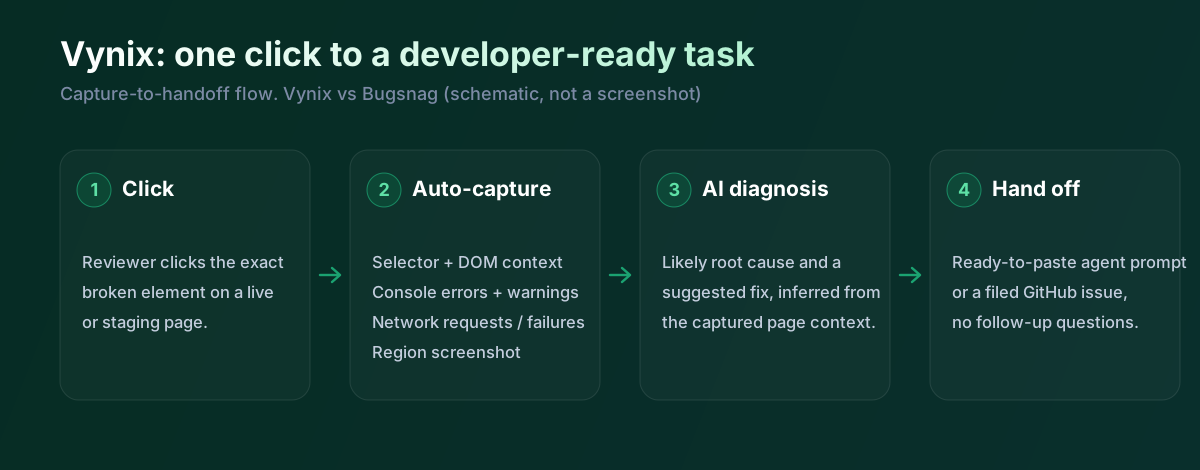
Vynix starts from the page, not the exception. A user drops a lightweight widget on a site, clicks on the thing that looks wrong, and Vynix captures the selected element, a screenshot, console context, network context, and a diagnosis of the likely root cause. That makes it better aligned with QA, product review, design review, and customer-facing website feedback than with crash monitoring.
This difference is most obvious for issues that do not produce a clean exception. A misaligned button, a broken image, a confusing interaction, a responsive layout problem, or a request that quietly returns the wrong data may not create the kind of crash Bugsnag is designed to prioritize. Vynix is intended to preserve the visual evidence and surrounding developer context while the reporter is still looking at the problem.
Vynix is also oriented toward turning feedback into implementation work. Instead of only producing a monitoring alert, it can generate a ready-to-build prompt or open a GitHub issue and assign it to a coding agent. That workflow is useful when the goal is not just to observe the issue, but to hand it directly to someone or something that can fix it.
Developer context and AI diagnosis
Bugsnag and Vynix both help developers avoid vague bug reports, but they collect context in different ways. Bugsnag records technical diagnostics around errors, such as stack traces, app version, release information, device or browser data, breadcrumbs, and custom metadata. This is valuable when the error is already known to the runtime and the team needs to understand frequency, severity, and affected users.
Vynix collects context around a human-selected page problem. The selected DOM element, screenshot, console output, and network activity are tied to the exact thing the reporter clicked. That context can be more useful for front-end and full-stack issues where the symptom is visible first and the underlying technical cause needs to be inferred.
The AI angle is also different. Vynix includes an AI root-cause diagnosis and produces a prompt that can be copied into a development workflow. Bugsnag provides automated grouping, diagnostics, and release stability signals, but it is not primarily positioned as a click-to-diagnose visual debugging assistant for a selected element on a page.
Team workflow and handoff
Bugsnag fits naturally into an operations and engineering monitoring workflow. Teams watch dashboards, triage error groups, connect alerts to Slack or issue trackers, and use release health to decide what needs attention. It is especially useful when a team needs to know how many users are affected, whether a release got worse, and which error groups should be fixed first.
Vynix fits a review and implementation workflow. It supports review rounds, projects, roles, and sharing so a team can collect page-specific feedback and keep it connected to the site being reviewed. The handoff is designed to be concrete: the issue includes visual evidence and developer context, then can move into GitHub or to a coding agent.
In practice, the products can be complementary. Bugsnag can remain the system of record for production crashes and stability trends, while Vynix can capture the visual and contextual feedback that automated monitoring often misses. A team deciding between them should start by asking whether its biggest gap is invisible runtime errors or visible website issues that are hard to turn into actionable developer tasks.
Bugsnag is strong at what it's for, which is the health of code that throws exceptions and crashes. It even has an MCP server now that feeds a coding agent, so it's moved toward AI too. Vynix sits earlier and wider. It doesn't wait for an exception. Someone clicks the thing that looks wrong, Vynix grabs the element, the console, the network and a screenshot, works out the likely cause and writes the handoff. Plenty of front-end problems never surface as a crash, and those are the ones this is built for.
When Bugsnag fits
Bugsnag is the better choice when you need continuous error and crash monitoring across production web, mobile, or backend applications. It is also the stronger fit when release health, stability score, error grouping, and affected-user prioritization are central to your workflow.
When Vynix fits
Vynix is the better choice when people need to click on a live page, capture what is wrong, and send developers the surrounding context. It is especially useful for visual bugs, QA review, product feedback, and handing issues to GitHub or a coding agent with enough detail to start building.
Example: what one Vynix capture contains
This is the bundle Vynix puts together the moment a reviewer clicks a broken element. No SDK exception needed to kick it off.
// One Vynix annotation, captured the moment someone clicks (no repro steps)
{
  element:    { selector: "button.checkout-cta", tag: "button", text: "Place order" },
  page:       { url: "/cart", viewport: "1280x720" },
  console:    ["TypeError: cart.total is undefined (checkout.js:184)"],
  network:    ["POST /api/checkout -> 500 (2,140 ms)"],
  screenshot: "region around the clicked element",
  diagnosis:  "Submit fires before /api/cart settles; guard the handler until totals resolve."
}
A tester notices the checkout button spins and never finishes. In Bugsnag that only shows up if the code threw and the SDK caught it. Vynix records the button, the TypeError in the console, the failed request and a screenshot straight away, then hands a developer or an agent a prompt they can act on. Many teams run both: Bugsnag for crash and stability tracking, Vynix for the visual issues a person reports.
Sources and last verified
We checked these ratings against each vendor's own docs on 18 July 2026. Ratings are for what the tool does natively, out of the box. Vynix's own column is checked against its widget and MCP docs. Spot something that's gone stale? Tell us and we'll fix it.
- Bugsnag product (AI fix suggestions via MCP) - bugsnag.com/product
- Bugsnag browser SDK (breadcrumbs: console + HTTP) - docs.bugsnag.com/platforms/javascript
- Vynix widget capture and MCP handoff - checked against product docs
Frequently asked questions
- Can Vynix replace Bugsnag for production error monitoring?
- Usually no. Vynix can capture developer context when someone reports a page issue, but Bugsnag is purpose-built for continuous crash and error monitoring, error grouping, affected-user analysis, and release stability tracking.
- Can Bugsnag capture visual bugs that do not throw errors?
- Not in the same way as Vynix. Bugsnag is strongest when an application reports an exception or error event, while Vynix is designed for a person to click a visible problem on a live page and capture the screenshot, element, console, and network context.
- Do Bugsnag and Vynix work together?
- Yes, they can be complementary. Bugsnag can monitor production stability and alert the team to crashes, while Vynix can collect human visual feedback and package it for a developer or coding agent.