Jira vs Vynix
Updated
Jira and Vynix solve different parts of the product and engineering workflow. Jira is a mature issue and project tracker, built for backlogs, workflows, reporting, and coordination across teams. Vynix is focused on capturing website feedback at the moment someone sees a problem, then packaging the technical context a developer or coding agent needs. The practical choice is whether you need a system of record for work, or a faster way to turn visual website issues into actionable engineering tasks.
At a glance
| Capability | Vynix | Jira | Notes |
|---|---|---|---|
| Backlog and issue tracking | Partial | Yes | Jira is built for issue tracking, boards, workflows, and reporting. Vynix tracks website feedback and review work, but is not a full Jira-style backlog system. |
| Click-to-annotate a live website | Yes | No | Vynix lets users click page elements directly through its widget. Jira has no native on-page annotation of a live website; it can only annotate uploaded image attachments, and live-page annotation requires third-party apps (as of July 2026, per atlassian.com/software/jira/features). |
| Automatic browser and developer context | Yes | No | Vynix captures the selected element, screenshot, console context, and network context. Jira does not natively collect this from a live webpage during issue creation. |
| AI root-cause diagnosis | Yes | Partial | Vynix uses captured page context (element, console, network) to suggest a likely cause. Jira's Rovo and Rovo Dev provide AI code assistance, but not front-end root-cause diagnosis from captured browser context (as of July 2026, per atlassian.com/software/rovo-dev). |
| Custom workflows and reporting | Partial | Yes | Jira offers extensive workflow configuration, dashboards, reports, and agile planning. Vynix has project and review workflow features, but is not as broad. |
| GitHub issue and coding agent handoff | Yes | Partial | Vynix can open a GitHub issue and generate a ready-to-paste coding-agent prompt. Jira has first-party GitHub integration and Rovo Dev can turn work items into code, but issue-to-agent handoff is not a single native capture-and-hand-off flow (as of July 2026). |
| Review rounds for website feedback | Yes | No | Vynix supports review rounds around annotated website feedback. Jira has generic workflow statuses and approvals, but no native visual website review rounds out of the box (as of July 2026, per atlassian.com/software/jira/features). |
| Projects, roles, and sharing | Yes | Yes | Both tools support organizing work by project and controlling access. Jira has deeper enterprise permission and administration options. |
What Jira does well
Jira is one of the most widely used tools for software issue tracking. It supports Scrum and Kanban boards, custom issue types, workflow statuses, permissions, dashboards, reports, automation rules, and integrations across the Atlassian ecosystem. For teams that need predictable backlog management, sprint planning, release tracking, and auditability, Jira is built for that level of process.
Its strength is structure. A product or engineering organization can define how work moves from idea to refinement, development, QA, release, and post-release review. Jira also works well when many teams need a shared vocabulary for priorities, dependencies, components, labels, and ownership.
That same structure can be more than a small website review or front-end bug report needs. Jira is usually the destination where an issue is triaged and tracked, not the place where a non-technical reviewer clicks directly on a broken page element and automatically captures browser context.
Where Vynix differs
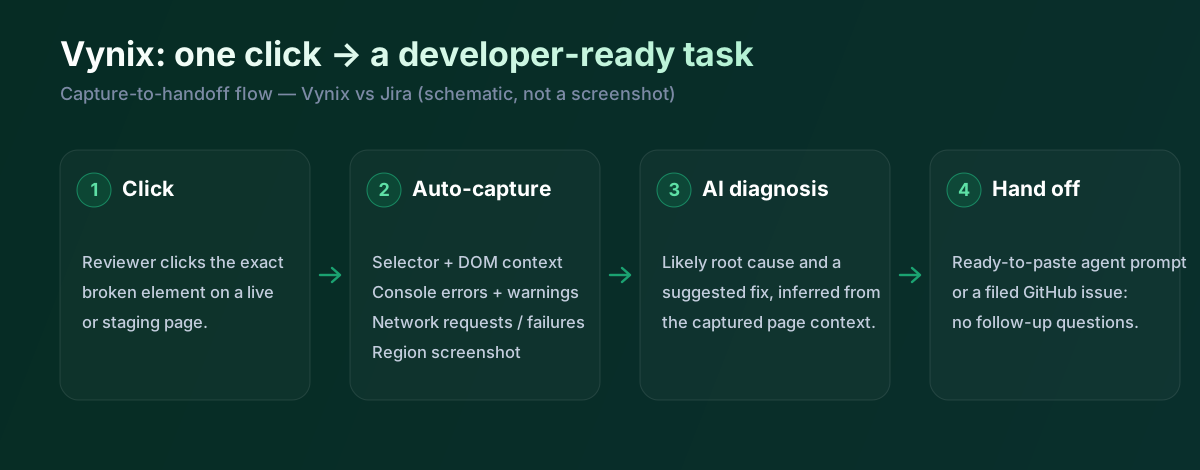
Vynix starts from the page itself. A lightweight widget can be added to a site so a reviewer can click on the exact element that looks wrong, behaves incorrectly, or needs discussion. Instead of asking the reporter to describe where the problem is, Vynix records the visual target and captures a screenshot around the moment of feedback.
That makes Vynix closer to a website annotation and developer-context layer than a traditional issue tracker. Its purpose is to reduce the gap between what a stakeholder sees in the browser and what an engineer needs to reproduce or fix the issue. The workflow is especially relevant for UI bugs, layout regressions, broken interactions, styling problems, and review comments on live or staging pages.
Vynix is not trying to replace every part of a large engineering management system. It is better understood as the front door for high-quality website feedback, with enough project, role, sharing, and review functionality to manage rounds of feedback before the work moves into implementation.
Developer context and AI diagnosis
A common weakness in visual feedback is missing technical detail. A screenshot can show what is wrong, but it rarely explains which element was clicked, what console errors appeared, or what network activity happened near the time of the report. Vynix is designed to capture that developer context automatically, including the selected element, screenshot, console context, and network context.
Vynix also adds an AI diagnosis of the likely root cause. That does not replace engineering judgment, but it can give a developer or coding agent a stronger starting point than a vague ticket. For example, the useful artifact is not just "button broken", but a more complete bundle of page location, browser evidence, and a suggested cause.
Jira can store technical details if someone adds them to the issue, and teams can attach screenshots, logs, links, or reproduction steps. However, Jira's native issue creation flow is not built around inspecting a live web page and automatically collecting front-end runtime context at the point of annotation.
Team workflow and handoff
For long-running team coordination, Jira remains the more comprehensive system. It is well suited to assigning work across teams, linking issues, planning sprints, tracking epics, and reporting on delivery. Many companies already use Jira as the authoritative backlog, so adding another project system may not be desirable for core engineering governance.
Vynix focuses on the handoff from observation to implementation. After capturing a website issue, users can copy a ready-to-build prompt or open a GitHub issue and assign it to a coding agent. That is a different model from manually writing a Jira ticket, waiting for clarification, and then translating the report into a developer-ready task.
The two tools can also be complementary. A team might use Vynix to collect precise website feedback and developer context, then use Jira for prioritization, sprint planning, release reporting, and cross-team visibility. The best fit depends on where the biggest bottleneck is: managing a backlog at scale, or creating clear, reproducible website issues in the first place.
When Jira fits
Jira is the better choice when you need a mature issue tracking system for backlog management, custom workflows, sprint planning, reporting, permissions, and cross-team coordination. It is also the safer choice when your company already runs engineering delivery through Atlassian and needs all work to live in one established system of record.
When Vynix fits
Vynix is the better choice when the main problem is turning website feedback into developer-ready work with screenshots, selected elements, console and network context, and AI diagnosis. It is especially useful for front-end bugs, visual QA, stakeholder review rounds, and handoff to GitHub issues or coding agents.
Example: what one Vynix capture contains
The difference is easiest to see in the payload. When a reviewer clicks a broken element, Vynix records the following automatically, without the reporter writing reproduction steps. This is the same context an engineer or coding agent would otherwise reconstruct by hand from a Jira ticket:
// One Vynix annotation, captured on click (no reporter effort)
{
  element:    { selector: "button.checkout-cta", tag: "button", text: "Place order" },
  page:       { url: "/cart", viewport: "1280x720" },
  console:    ["TypeError: cart.total is undefined (checkout.js:184)"],
  network:    ["POST /api/checkout -> 500 (2,140 ms)"],
  screenshot: "region around the clicked element",
  diagnosis:  "Submit fires before /api/cart settles; guard the handler until totals resolve."
}
A Jira ticket can hold all of this, but only if a person gathers and pastes it in. For example, a QA reviewer on a staging site clicks a mis-aligned "Place order" button: Vynix captures the selector, the console TypeError, and the failing checkout request in one step, then opens a GitHub issue with a ready-to-build prompt. In a Jira-only flow the same report usually starts as "checkout looks broken" and needs a round of clarification before an engineer can reproduce it.
The two tools are complementary rather than mutually exclusive: Vynix is the high-fidelity front door for website issues, and Jira remains the system of record where that work is prioritised, planned, and reported across teams.
Sources and last verified
Competitor capabilities were checked against the vendor's official documentation on 18 July 2026. Ratings describe native, out-of-the-box functionality; third-party marketplace add-ons are not counted as native. Vynix's own ratings are verified against its widget and MCP documentation. If anything here is out of date, tell us and we will correct it.
- Jira features: atlassian.com/software/jira/features
- Atlassian Rovo Dev: atlassian.com/software/rovo-dev
- GitHub for Jira (first-party app): marketplace.atlassian.com/apps/1219592
- Vynix widget capture and MCP handoff: verified against product documentation
Frequently asked questions
- Can Vynix replace Jira?
- Usually not for a large team that relies on Jira for backlog management, sprint planning, custom workflows, reporting, and company-wide delivery processes. Vynix is better seen as a way to capture high-quality website feedback and developer context before work is handed to engineers or another tracking system.
- Can Jira be used for website bug reports?
- Yes, Jira can track website bugs, assign them, prioritize them, and report on their progress. The difference is that Jira typically depends on the reporter to add screenshots, reproduction steps, logs, and technical details manually, while Vynix is designed to capture much of that context from the page.
- Which tool is better for non-technical stakeholders reviewing a website?
- Vynix is generally a better fit when stakeholders need to click directly on a page and leave precise visual feedback. Jira can work if stakeholders are comfortable creating structured issues, but it is less direct for page-level annotation and automatic front-end context capture.