Jam alternatives in 2026
Updated
Jam is a popular choice for capturing bugs with useful context, but it is not the only option. The best alternative depends on whether your team needs website feedback, client annotation, error monitoring, or deeper developer handoff.
What to look for
- How much technical context each report captures
- Ease of use for non-technical teammates and clients
- Integrations with your issue tracker and development workflow
- Support for screenshots, recordings, console logs, and network data
- Fit for your main use case, such as QA, client feedback, or production errors
1. Vynix (our pick for context and AI handoff)
Best for: teams that want visual feedback with developer context and an AI diagnosis that hands work to a coding agent.
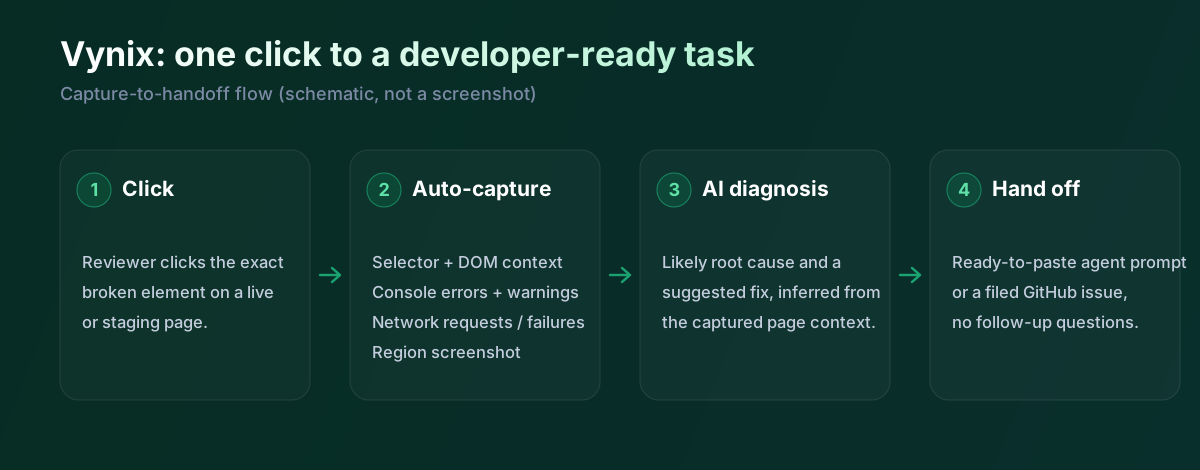
Vynix fits teams that want website feedback to turn into developer-ready context quickly. It is especially relevant when a bug starts with someone clicking on a broken element, since it captures the page context, screenshot, console and network details, and an AI diagnosis that can be used to create a GitHub issue or prompt a coding agent.
Try Vynix free
2. Marker.io
Best for: agencies and product teams that want client feedback to land straight in Jira, Trello, or Asana.
Marker.io puts a feedback widget on staging and live sites so clients and testers can point at a problem, annotate it, and file it without an account in your tracker. Each report syncs to your existing project tool with a screenshot and technical metadata attached. It is built to route visual feedback into project management, and it added an MCP server in 2026 so an agent can read an issue, but it doesn't diagnose the code behind the problem itself.
3. Usersnap
Best for: product and CX teams collecting bug reports and user sentiment in one place.
Usersnap combines a visual feedback widget with surveys and feature-request boards, so teams can gather annotated screenshots and structured user input across the product. It is a common pick for customer-facing feedback programs. It has AI for labelling and summarising feedback, but the emphasis is on collecting and organising it rather than producing a developer-ready diagnosis of the bug.
4. Sentry
Best for: engineering teams that need automatic error and performance monitoring in production.
Sentry instruments your application to catch exceptions and performance issues automatically, with stack traces, breadcrumbs, and release tracking that point to where code broke. It is a developer staple for catching problems users never report. It watches running code rather than capturing a person pointing at something wrong on the page.
5. BugHerd
Best for: agencies collecting point-and-click website feedback from non-technical clients.
BugHerd pins feedback onto a web page like sticky notes and turns each one into a task on a built-in kanban board, capturing the page, browser, and CSS selector automatically. Agencies like it because clients can comment without learning a tracker. It focuses on collecting and organising visual feedback. There's beta AI for auto-tagging and an MCP server now, but nothing that diagnoses why the bug happened.
How we keep this honest
We checked each tool against its own site and docs on 18 July 2026, and we only describe what a tool does natively. Some of these have shipped AI and MCP features recently, so we've tried to reflect that rather than pretend Vynix is the only one moving. If something here has drifted out of date, tell us and we'll fix it.
- Marker.io - marker.io
- Usersnap - usersnap.com/features
- Sentry (Seer AI) - sentry.io/product/seer
- BugHerd - bugherd.com/features
- Vynix widget capture and MCP handoff - checked against product docs
Frequently asked questions
- What should I look for in a Jam alternative?
- Look for the type of context your team needs most, such as screenshots, recordings, console logs, network data, annotations, or production error details. Also check whether the tool fits your workflow with integrations for GitHub, Jira, Linear, Slack, or other systems your team already uses.
- Are Jam alternatives better for developers or for non-technical users?
- It depends on the product. Some tools are designed for developers and focus on logs, stack traces, and error monitoring, while others are built for designers, QA teams, clients, or product managers who need simple visual feedback and annotations.
- Which Jam alternative is best for website annotation?
- For website annotation, prioritize tools that let users click on page elements, add visual feedback, and send reports with enough technical context for developers to act on. Vynix, Marker.io, Usersnap, and BugHerd are all relevant options to compare for this use case.