Jam vs Vynix
Updated
Jam and Vynix both try to reduce the time developers spend asking for missing bug details, but they start from different places. Jam is a browser-extension-based bug reporting tool that turns a screenshot or short recording into a shareable report with technical context. Vynix is a website annotation and developer-context layer that captures the clicked element, page evidence, and an AI diagnosis before handing work to a human developer or coding agent. The real choice is whether your team mainly needs faster bug capture, or a more structured path from on-page feedback to an implementation-ready fix request.
At a glance
| Capability | Vynix | Jam | Notes |
|---|---|---|---|
| Click-to-annotate a specific page element | Yes | Partial | Vynix is designed around clicking what is wrong on the page; Jam captures screenshots or recordings, but its core flow is not an embedded element-level annotation widget. |
| Screenshot capture | Yes | Yes | Both tools capture visual evidence of the issue so it can be shared with developers. |
| Short screen recording | No | Yes | Jam is known for screenshot and short screen-recording bug reports; Vynix is described around click annotation and screenshot capture. |
| Console logs, network requests, and environment context | Yes | Yes | Jam bundles logs, requests, and environment details with a report; Vynix captures console and network context around the annotated page issue. |
| AI root-cause diagnosis | Yes | Partial | JamGPT reads the full bug context and suggests where to look, and can even rewrite the broken code. Jam frames it as a pair debugger that still needs an engineer, so Vynix's automatic diagnosis is a touch more turnkey (checked July 2026, per jam.dev/blog/introducing-jamgpt-ai-debugging-assistant). |
| Ready-to-build prompt for a coding agent | Yes | Partial | Jam ships a native MCP server that pipes console, network and repro context into Claude Code, Cursor and others, and JamGPT can rewrite code. It's a real handoff, just via MCP rather than an auto-generated paste-ready prompt like Vynix produces (checked July 2026, per jam.dev/mcp). |
| Issue tracker handoff | Yes | Yes | Vynix can open a GitHub issue from the annotated context; Jam reports can be handed into external trackers through links and integrations. |
| Projects, roles, and team sharing | Yes | Varies | Vynix includes projects, roles, and sharing; Jam supports team collaboration, but workspace controls and administrative features can depend on the plan. |
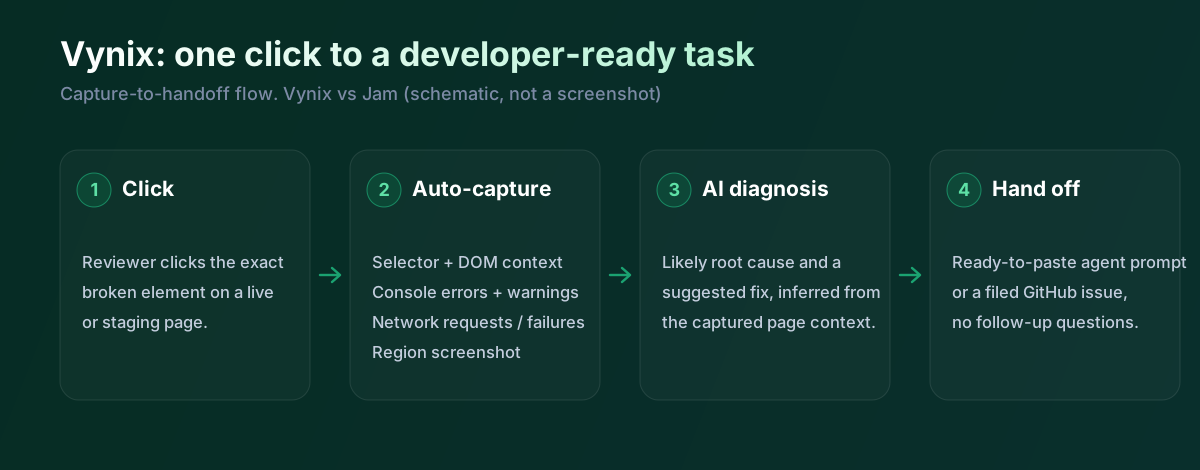
What Jam does well
Jam is strongest when the immediate problem is getting a reproducible bug report out of a non-developer's browser. A product manager, QA tester, designer, or support teammate can capture a screenshot or short screen recording and share a link that includes console logs, network requests, browser details, operating system details, and other reproduction context. That is useful for bugs where the visual symptom alone is not enough, such as a failed API request, a JavaScript error, or an issue that only happens in a particular browser session.
Jam also fits teams that already have an issue tracker and do not want a new workflow layer. The report is the artifact: it can be pasted into Jira, Linear, GitHub, Slack, or whichever system the team uses to triage and assign engineering work. In that setup, Jam reduces the back and forth before a ticket is accepted, while the prioritization, ownership, and fix process remain outside Jam.
Where Vynix differs
Vynix is built around annotating the live website itself. Instead of starting with a generic screenshot or recording, the user clicks the specific part of the page that is wrong, and Vynix captures the selected element, a screenshot, and the surrounding developer context. That makes it a better fit for feedback that is tied to a visible UI element, such as a broken button, a misaligned section, incorrect copy, a failed interaction, or a state-specific frontend bug.
The other major difference is that Vynix treats the capture as the beginning of the fix, not just the bug report. It adds an AI root-cause diagnosis and produces a ready-to-build prompt or GitHub issue that can be assigned to a coding agent. That does not remove the need for engineering review, but it gives the receiving developer or agent a more directed starting point than a raw report alone.
Developer context and AI diagnosis
Both tools address a real pain point: screenshots without logs are often not enough for frontend bugs. Jam bundles the report with console output, network activity, and environment details so a developer can inspect what happened around the time of the capture. This is especially valuable for intermittent bugs, authentication-state problems, failed requests, and issues that are hard for engineers to reproduce on their own machines.
Vynix goes a step further by pairing the captured evidence with an AI diagnosis of the likely root cause. That distinction matters if your team wants the report to arrive with a hypothesis, not just the raw facts. The tradeoff is that AI diagnoses should be treated as guidance rather than proof: logs, code review, and testing still matter, but a good hypothesis can shorten the first investigation pass.
Team workflow and handoff
Jam is a practical choice when your organization already has mature ticket triage and ownership rules. It helps people create richer bug reports quickly, then lets the existing tracker decide priority, assignee, sprint placement, and release timing. For many engineering teams, that is exactly the right boundary because it avoids duplicating systems of record.
Vynix is more opinionated about the handoff from feedback to fix. Projects, roles, sharing, review rounds, GitHub issue creation, and coding-agent-ready prompts make it better suited to teams that want website feedback, technical context, and implementation handoff in one flow. If a team is actively using AI coding agents, that built-in handoff can be more important than simply producing a well-documented bug link.
Jam is close to Vynix in spirit, and it's a good tool. It captures console, network and repro steps, JamGPT suggests where to look, and its MCP server pipes all that into a coding agent. So this isn't a case of Jam lacking AI. The differences are narrow: Vynix centres the report on the exact element you clicked and produces a ready-to-paste prompt as its default output, where Jam leans on a screen recording plus MCP. Honestly, if you like Jam you'll find Vynix familiar. Pick based on whether you want element-level capture and a prompt, or recording plus MCP.
When Jam fits
Jam is the better choice when your main goal is fast, low-friction bug reporting through a browser extension, especially with screenshots or short screen recordings. It is also a good fit when your team already runs triage, assignment, and fixes in an existing tracker and only needs richer reports.
When Vynix fits
Vynix is the better choice when feedback is tightly tied to specific website elements and you want captured context to become a fix-ready work item. It is also stronger when your workflow includes AI root-cause diagnosis, coding-agent handoff, review rounds, and project-based collaboration.
Example: what one Vynix capture contains
Here's what Vynix records on a click. Jam captures a similar bundle, so the interesting part is the shape of the output rather than whether the context exists.
// One Vynix annotation, captured the moment someone clicks (no repro steps)
{
  element:    { selector: "button.checkout-cta", tag: "button", text: "Place order" },
  page:       { url: "/cart", viewport: "1280x720" },
  console:    ["TypeError: cart.total is undefined (checkout.js:184)"],
  network:    ["POST /api/checkout -> 500 (2,140 ms)"],
  screenshot: "region around the clicked element",
  diagnosis:  "Submit fires before /api/cart settles; guard the handler until totals resolve."
}
A developer hits a bug and fires Jam: they get a shareable link with the logs and a recording, and can pass it to their agent over MCP. In Vynix they click the element and get the selector, console, network and screenshot, plus a diagnosis and a prompt written out for them. Both get you most of the way; the choice comes down to element-level capture and a paste-ready prompt versus recording and MCP.
Sources and last verified
We checked these ratings against each vendor's own docs on 18 July 2026. Ratings are for what the tool does natively, out of the box. Vynix's own column is checked against its widget and MCP docs. Spot something that's gone stale? Tell us and we'll fix it.
- Jam MCP server - jam.dev/mcp
- JamGPT AI debugging assistant - jam.dev/blog/introducing-jamgpt-ai-debugging-assistant
- Vynix widget capture and MCP handoff - checked against product docs
Frequently asked questions
- Is Jam mainly a bug reporting tool?
- Yes. Jam is best understood as a bug reporting and repro-context tool: it captures a screenshot or short recording and packages it with logs, network requests, and environment details. The actual tracking, prioritization, and fixing usually continue in the team's existing issue tracker.
- Does Vynix replace an issue tracker?
- Not necessarily. Vynix can create a GitHub issue and prepare a coding-agent-ready prompt, but teams may still use GitHub, Jira, Linear, or another tracker as the system of record. Its value is in turning website feedback into a more complete and actionable fix request.
- Which is better for AI coding-agent workflows?
- Vynix is the more direct fit because it captures the element and developer context, adds an AI root-cause diagnosis, and produces a prompt or issue that can be assigned to a coding agent. Jam can still provide useful evidence for an AI-assisted workflow, but its main artifact is the bug report rather than an agent-ready task.