BugHerd vs Vynix
Updated
BugHerd and Vynix both start from the same basic moment: someone sees a problem on a website and needs to point at it clearly. BugHerd is built around visual feedback, sticky-note style annotations, and a task board that keeps client comments organized. Vynix is built around annotation plus developer context, with console and network details, AI diagnosis, and a path into GitHub or a coding agent. The real choice is whether your team mainly needs a client-friendly feedback board or a faster route from page issue to implementation work.
At a glance
| Capability | Vynix | BugHerd | Notes |
|---|---|---|---|
| Click-to-annotate web pages | Yes | Yes | Both tools let reviewers click directly on a page and attach feedback to the relevant place. |
| Pinned visual feedback for clients | Yes | Yes | BugHerd is especially known for sticky-note style client feedback, while Vynix also supports page annotation. |
| Built-in feedback task board | Partial | Yes | BugHerd turns feedback into tasks on its own kanban board; Vynix focuses more on review rounds and developer handoff. |
| Automatic screenshot and element context | Yes | Yes | Vynix captures the selected element and screenshot; BugHerd captures page context and CSS selector information with feedback. |
| Console and network debugging context | Yes | Partial | Vynix records console errors and network requests with each report. BugHerd auto-captures console errors alongside browser, OS, and URL metadata, but not native network/XHR traffic. Full session and network context comes via its LogRocket or FullStory integrations (as of July 2026, per bugherd.com/features and bugherd.com/integrations). |
| AI root-cause diagnosis | Yes | No | Vynix provides an AI diagnosis of the likely cause from captured page context. BugHerd has AI features (BugHerd AI beta for auto-tagging and titles, plus an MCP server beta), but no AI root-cause diagnosis (as of July 2026, per bugherd.com/features). |
| GitHub issue and coding-agent handoff | Yes | Partial | Vynix can create a GitHub issue and generate a ready-to-paste coding-agent prompt. BugHerd's GitHub integration creates issues from tasks and updates status via commits, but it is not deep two-way sync and has no coding-agent prompt handoff (as of July 2026, per bugherd.com/integrations). |
| Projects, roles, sharing, and review rounds | Yes | Yes | Both support organized team review workflows, with BugHerd emphasizing client feedback management and Vynix emphasizing review-to-development flow. |
What BugHerd does well
BugHerd is strongest when the main problem is collecting website feedback from people who do not want to learn Jira, Linear, GitHub Issues, or a similar tracker. Reviewers can click on a page, leave a comment in context, and BugHerd turns that feedback into a task. The pinned note model is easy to understand because it matches how designers, clients, and QA reviewers naturally talk about web pages: this button, this headline, this section.
Its built-in kanban board is a major part of the product. Feedback does not just sit as a comment on the page, it becomes work that can be triaged, assigned, moved through statuses, and discussed. That is why agencies and web teams often use BugHerd during design review, content QA, UAT, and client approval rounds.
BugHerd also captures useful technical metadata automatically, including the page, browser information, and CSS selector associated with the feedback. That does not make it a full debugging platform, but it removes a lot of the back-and-forth that usually happens when a client writes, "it looks broken on my screen" without saying where or how.
Where Vynix differs
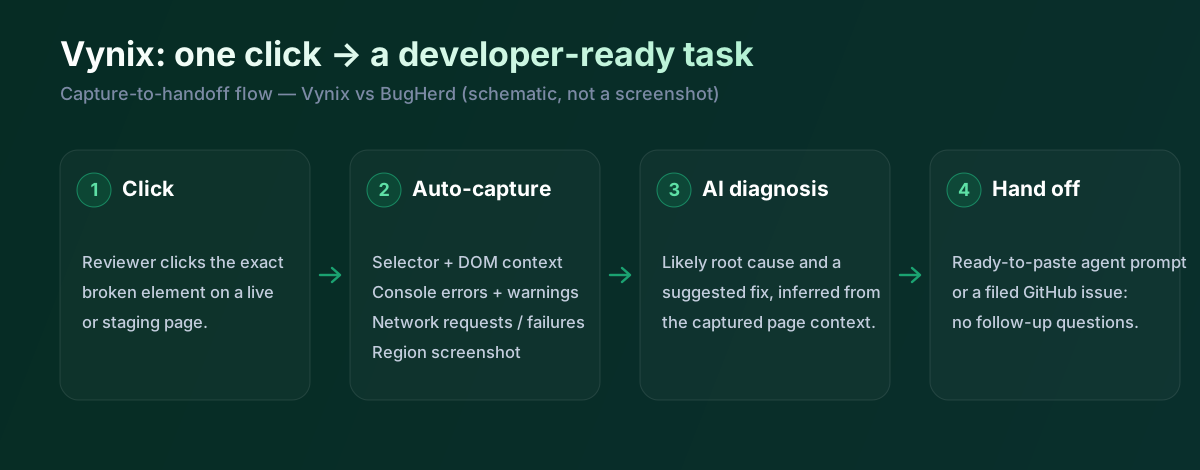
Vynix starts with the same click-to-annotate workflow, but its center of gravity is different. Instead of primarily organizing visual feedback into a task board, Vynix focuses on giving a developer or coding agent enough context to understand what likely went wrong. When a reviewer clicks on a problem, Vynix captures the element, a screenshot, console and network context, and an AI diagnosis of the likely root cause.
That makes Vynix more developer-facing than a traditional visual feedback tool. The annotation is not just a note saying what looks wrong, it becomes a packaged debugging artifact. For teams using AI coding tools, that distinction matters because the next step is often not manual triage, but producing a clear prompt or opening a GitHub issue that an agent can work from.
Vynix is also designed for repeated review cycles rather than one-off screenshots. Projects, roles, sharing, and review rounds help teams separate feedback by site, release, client, or sprint. The product is still about website annotation, but it pushes the workflow closer to code execution.
Developer context and AI diagnosis
BugHerd captures context that is very useful for reproducing visual feedback: the URL, the browser environment, and the selected element on the page. For many content, layout, and design-review issues, that is enough. A developer can open the task, see where the note is pinned, and inspect the page directly.
Vynix goes deeper into runtime context. Console output and network activity can reveal failed API calls, JavaScript errors, missing assets, authorization problems, or hydration issues that are not obvious from a screenshot alone. The AI diagnosis is not a substitute for engineering judgment, but it can give the developer a first hypothesis instead of starting from a blank page.
This is the clearest product difference. BugHerd helps teams describe and organize what is wrong on the page. Vynix tries to explain why it may be wrong and prepares the issue for implementation, especially in teams where AI-assisted development is already part of the workflow.
Team workflow and handoff
BugHerd is a better fit when feedback management is the bottleneck. Its board, comments, assignments, and client-friendly review flow make it practical for agencies that need to run structured approval cycles with nontechnical stakeholders. It keeps feedback visible without forcing every client comment into an engineering system too early.
Vynix is a better fit when engineering handoff is the bottleneck. A reviewer can annotate the problem, and the tool captures the kind of context a developer usually asks for later. From there, the team can copy a ready-to-build prompt or open a GitHub issue and assign it to a coding agent.
In practice, the decision depends on where work gets stuck. If comments are scattered across emails, screenshots, and calls, BugHerd solves a real coordination problem. If issues are already identified but developers or agents lack enough context to fix them quickly, Vynix is aimed more directly at that gap.
BugHerd is not AI-free: it ships a beta AI assistant for auto-tagging and titles and an MCP server (beta) that lets an external agent read tasks. The difference from Vynix is what happens to the technical context. BugHerd is built to collect and organise pinned feedback on a kanban board, capturing console errors and page metadata; Vynix adds network-request context, runs an AI root-cause diagnosis on the captured page state, and generates a ready-to-paste prompt so a coding agent can start work without a follow-up question.
When BugHerd fits
BugHerd is the better choice when you need a proven, client-friendly visual feedback board for website reviews, UAT, and agency approval workflows. It is especially strong when nontechnical reviewers need to leave pinned comments and the team wants to triage them on a built-in kanban board.
When Vynix fits
Vynix is the better choice when feedback needs to become developer-ready work with screenshots, element context, console and network data, and an AI root-cause diagnosis. It is especially useful for teams that want to hand annotated issues to GitHub or a coding agent with less manual explanation.
Example: what one Vynix capture contains
Both tools pin feedback to the right place on the page. The difference is in the developer payload that comes with it. A single Vynix annotation records this automatically on click:
// One Vynix annotation, captured on click (no reporter effort)
{
  element:    { selector: "button.checkout-cta", tag: "button", text: "Place order" },
  page:       { url: "/cart", viewport: "1280x720" },
  console:    ["TypeError: cart.total is undefined (checkout.js:184)"],
  network:    ["POST /api/checkout -> 500 (2,140 ms)"],
  screenshot: "region around the clicked element",
  diagnosis:  "Submit fires before /api/cart settles; guard the handler until totals resolve."
}
For example, a client reviewing a staging site drops a pin on a broken "Place order" button. BugHerd captures the screenshot, the pinned element, and the console error, and routes a card to its board for the team to triage; Vynix captures the same plus the failing checkout request, diagnoses the likely cause, and opens a GitHub issue with a ready-to-build prompt. If your priority is client-friendly feedback management on a shared board, BugHerd is the stronger fit; if it is moving website issues into agent-ready engineering work, that is where Vynix focuses.
Sources and last verified
Competitor capabilities were checked against the vendor's official documentation on 18 July 2026. Ratings describe native, out-of-the-box functionality; capabilities provided only through third-party integrations are noted as such. Vynix's own ratings are verified against its widget and MCP documentation. If anything here is out of date, tell us and we will correct it.
- BugHerd features: bugherd.com/features
- BugHerd integrations (GitHub, LogRocket, FullStory): bugherd.com/integrations
- Vynix widget capture and MCP handoff: verified against product documentation
Frequently asked questions
- Is BugHerd more of a project management tool than Vynix?
- BugHerd includes a built-in kanban board, assignments, comments, and task statuses, so it can manage feedback without immediately moving everything into another tracker. Vynix is more focused on capturing developer context and handing work to GitHub or a coding agent.
- Does Vynix replace BugHerd for client website feedback?
- It can cover page annotation and review workflows, but the fit depends on what your team values most. If your priority is simple client feedback collection and visual task triage, BugHerd is very strong; if your priority is developer-ready debugging context, Vynix is more specialized.
- Which tool is better for AI-assisted development?
- Vynix is the clearer fit for AI-assisted development because it captures console and network context, produces an AI root-cause diagnosis, and supports handoff to a coding agent. BugHerd can still be useful upstream for collecting feedback, but it is not primarily designed as an AI debugging or agent handoff tool.