Replay.io vs Vynix
Updated
Replay.io and Vynix solve different parts of the bug-reporting and debugging problem. Replay.io is a deep developer debugging tool that records a runtime so engineers can inspect it later with browser-like devtools. Vynix is built around website annotation, automatic context capture, AI diagnosis, and handoff from reviewers to developers or coding agents. The real choice is whether your team needs deterministic runtime replay, or a faster way to turn visual website feedback into build-ready work.
At a glance
| Capability | Vynix | Replay.io | Notes |
|---|---|---|---|
| Click-to-annotate page feedback | Yes | No | Vynix provides an on-page annotation widget; Replay.io is centered on recording and replaying browser execution. |
| Deterministic runtime replay | No | Yes | Replay.io records a runtime for later inspection with developer tools; Vynix captures issue context at the annotation moment. |
| Automatic screenshot and element capture | Yes | Partial | Vynix captures the clicked element and screenshot as part of feedback; Replay captures a session rather than an element-specific annotation. |
| Console and network context | Yes | Yes | Both can surface console and network information, but Replay does it through a recorded debugging session while Vynix attaches it to a page annotation. |
| AI root-cause diagnosis | Yes | Yes | Replay's headline product, Replay QA, produces a root-cause analysis with a confidence score and a suggested fix from a deterministic recording, so this is a Yes. Vynix does the same from a visual report rather than a recorded test run (checked July 2026, per replay.io). |
| Handoff to GitHub issue or coding agent | Yes | Yes | Replay posts root cause and fixes as GitHub PR comments, sends bug reports to GitHub Issues, Linear or Jira, and feeds bugs to an agent to fix, so both handoffs are native. Vynix differs by starting from a person's page annotation (checked July 2026, per replay.io/pricing). |
| Non-technical reviewer workflow | Yes | No | Replay QA is fully autonomous and the time-travel debugger is developer-only. There's no non-technical reviewer clicking on a page, which is Vynix's whole entry point (checked July 2026, per replay.io). |
| Review rounds, projects, roles and sharing | Yes | Partial | Vynix includes review and project organization features; Replay supports collaborative debugging around recordings, but not the same visual review-round model. |
A note on positioning: Replay.io now leads with Replay QA, an autonomous AI QA product built on its deterministic replay engine, while the original time-travel debugger is still around. Both are developer tools, which shapes the comparison below.
What Replay.io does well
Replay.io is strongest when the hard part is reproducing a bug. It records a browser execution so developers can revisit the session later, inspect console output, look at network activity, step through code, and add logging after the recording has already happened. That makes it especially useful for intermittent failures, flaky behavior, and bugs where a normal screenshot or written report does not preserve enough execution detail.
The product is aimed at engineers who are comfortable working in debugging tools. Instead of asking a reporter to describe what happened, Replay lets a developer inspect the captured run and reason through the code path after the fact. This is a different workflow from traditional bug intake, because the value comes from preserving runtime state rather than gathering reviewer comments on the page.
Replay.io is not primarily a visual feedback layer for stakeholders, QA reviewers, designers, or clients. It can be very powerful once an engineer is debugging, but it assumes the team wants to analyze a recorded execution, not simply click on a broken element and turn that observation into an implementation task.
Where Vynix differs
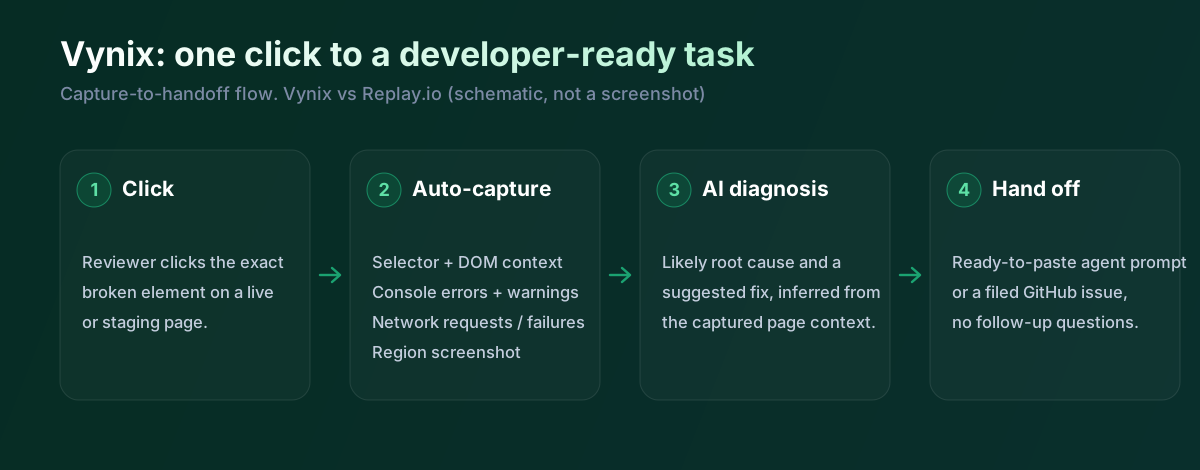
Vynix starts from the page, not from a full runtime replay. A lightweight widget is added to the site, and a reviewer can click directly on the thing that looks wrong. Vynix then captures the selected element, a screenshot, and nearby developer context such as console and network information tied to that moment.
That makes Vynix a better fit for product review, QA passbacks, website polishing, and agency-client feedback loops. The person reporting the issue does not need to open devtools, reproduce a sequence in a special browser, or explain DOM details. They point at the problem, and the tool packages the technical context for someone else to act on.
The tradeoff is that Vynix is not trying to replace a time-travel debugger. If a bug depends on subtle JavaScript state, async timing, or a long sequence of execution steps, Replay.io can preserve more of the runtime for an engineer to investigate. Vynix is more focused on shortening the path from observed page issue to actionable development task.
Developer context and AI diagnosis
Replay.io and Vynix both help developers avoid vague bug reports, but they collect context in different ways. Replay.io captures a recorded execution and lets the engineer inspect it later, including code paths and runtime behavior. Vynix captures context around a specific annotation, including the element, screenshot, console output, network clues, and an AI-generated diagnosis of the likely root cause.
For a developer, Replay.io is deeper when the question is, "What exactly happened in this run?" It is designed for stepping through code, adding logs after the fact, and understanding a failure that may be difficult to reproduce. That depth is valuable, but it also means the debugging work still happens inside the developer's investigation.
Vynix is more opinionated about turning captured context into the next action. Its AI diagnosis and ready-to-build prompt are meant to summarize the likely cause and give a developer or coding agent a useful starting point. That does not remove the need for engineering judgment, but it can reduce the back-and-forth that usually happens when a reviewer reports a visual or functional issue without technical detail.
Team workflow and handoff
Replay.io fits best inside an engineering debugging workflow. A developer, test engineer, or technically oriented team member records or shares a replay, and other engineers inspect the captured session. For teams dealing with flaky tests, browser-specific behavior, or hard-to-reproduce failures, that shared recording can be more useful than a conventional issue description.
Vynix is built more around intake, review rounds, and handoff. Projects, roles, sharing, and review workflows help organize feedback from people who may not be developers. Once an issue is captured, the team can copy a prompt or open a GitHub issue and assign it to a coding agent, which is closer to how modern teams move from review to implementation.
The products can also be complementary in larger teams. Vynix can capture and route the majority of visible website issues, while Replay.io can be reserved for cases where the captured context is not enough and an engineer needs to reconstruct the exact runtime behavior. Choosing one as the primary tool depends on whether your bottleneck is feedback collection or deep debugging.
Replay is a serious, developer-grade product. Deterministic replay, AI root-cause through Replay QA, and native GitHub and agent handoff, and the table now credits all of that. It's strong where it's strong. The real difference is who kicks the process off. Replay runs on its own or needs a developer to drive it; Vynix is triggered by a non-technical person clicking the exact thing that looks wrong on a live page. That entry point, and the readable report it produces, is the divide.
When Replay.io fits
Replay.io is the better choice when your main problem is reproducing and investigating complex runtime bugs. It is especially strong for engineers who need to step through a recorded browser session, add logs after the fact, and inspect what happened in code.
When Vynix fits
Vynix is the better choice when you need reviewers to click on page issues and automatically package the developer context. It is also stronger when the desired output is a GitHub issue, coding-agent handoff, or ready-to-build prompt rather than a deep debugging recording.
Example: what one Vynix capture contains
Here's what Vynix records when a reviewer clicks a broken element. Replay reaches similar conclusions, but from a recorded run rather than a person's click.
// One Vynix annotation, captured the moment someone clicks (no repro steps)
{
  element:    { selector: "button.checkout-cta", tag: "button", text: "Place order" },
  page:       { url: "/cart", viewport: "1280x720" },
  console:    ["TypeError: cart.total is undefined (checkout.js:184)"],
  network:    ["POST /api/checkout -> 500 (2,140 ms)"],
  screenshot: "region around the clicked element",
  diagnosis:  "Submit fires before /api/cart settles; guard the handler until totals resolve."
}
Replay QA can run autonomously and hand a developer a root cause with a suggested fix, which is powerful for automated coverage. Vynix covers the other lane: a stakeholder or tester sees something off, clicks it, and you get the element, the console, the network and a screenshot, plus a diagnosis and a prompt. One is autonomous and developer-facing; the other starts with a human pointing at the problem.
Sources and last verified
We checked these ratings against each vendor's own docs on 18 July 2026. Ratings are for what the tool does natively, out of the box. Vynix's own column is checked against its widget and MCP docs. Spot something that's gone stale? Tell us and we'll fix it.
- Replay.io (Replay QA, AI root-cause) - replay.io
- Replay.io pricing and handoff - replay.io/pricing
- Replay.io docs (deterministic debugger) - docs.replay.io
- Vynix widget capture and MCP handoff - checked against product docs
Frequently asked questions
- Is Replay.io a replacement for Vynix?
- Usually no. Replay.io is a deep debugging tool for recorded executions, while Vynix is a website annotation and handoff tool. They overlap in helping developers get context, but they start from different workflows.
- Which tool is better for flaky bugs?
- Replay.io is usually better for flaky or hard-to-reproduce bugs because it preserves a recorded runtime that developers can inspect later. Vynix is better when the issue can be pointed out on the page and the team needs quick context, diagnosis, and routing.
- Can non-developers use these tools?
- Vynix is designed for non-developers and technical users to click on page issues and capture useful context. Replay.io is most valuable for developers or QA engineers who understand how to inspect a recorded session with debugging tools.