Ruttl vs Vynix
Updated
Ruttl and Vynix both help teams give feedback on websites, but they are built for different moments in the workflow. Ruttl is strongest when designers, marketers, clients, and reviewers need to comment on live pages, make light visual edits, and approve work. Vynix is more developer-focused: it turns a click on a broken element into a bug report with screenshot, element, console, network, and AI diagnosis context. The choice is less about which tool is broader and more about whether your bottleneck is review sign-off or getting issues into a build-ready state.
At a glance
| Capability | Vynix | Ruttl | Notes |
|---|---|---|---|
| Click-to-annotate live websites | Yes | Yes | Both tools let reviewers point to parts of a live page and leave contextual feedback. |
| Visual design review and client approval | Partial | Yes | Ruttl is focused on review and approval, while Vynix is more focused on developer-ready issue capture. |
| Small visual edits on reviewed pages | No | Yes | Ruttl supports light visual edits during review; Vynix is an annotation and diagnostic handoff tool. |
| Image and design file annotation | No | Yes | Ruttl covers images and design files as well as websites; Vynix is centered on websites with an embedded widget. |
| Automatic element, screenshot, console, and network context | Yes | Partial | Vynix captures developer context automatically; Ruttl is primarily visual feedback and review context. |
| AI root-cause diagnosis | Yes | No | Ruttl AI does comment sentiment and performance suggestions, not bug root-cause diagnosis. Vynix diagnoses the specific issue from its captured context (checked July 2026, per ruttl.com). |
| GitHub issue and coding-agent handoff | Yes | No | Ruttl integrates with Trello, Slack, Asana, Jira, Zapier and ClickUp, but has no native GitHub integration and no coding-agent handoff. Vynix opens a GitHub issue and writes an agent prompt directly (checked July 2026, per ruttl.com/pricing). |
| Projects, roles, sharing, and review rounds | Yes | Yes | Both support team collaboration around feedback, though the intended handoff differs. |
What Ruttl does well
Ruttl is built around visual feedback and approval. Reviewers can comment on live websites, annotate images and design files, and make small visual edits such as text changes or layout feedback during review. That makes it useful for design teams, agencies, and client-facing workflows where the main problem is collecting clear feedback without long email threads or marked-up screenshots.
Its value is especially clear near the review-and-approve stage. Nontechnical stakeholders can point at what they want changed, designers can interpret the feedback in context, and teams can move toward sign-off without asking every reviewer to write a formal bug report. Ruttl is not primarily positioned as a developer observability or diagnostic tool, so its strength is the clarity of visual feedback rather than automatically explaining why something broke.
Where Vynix differs
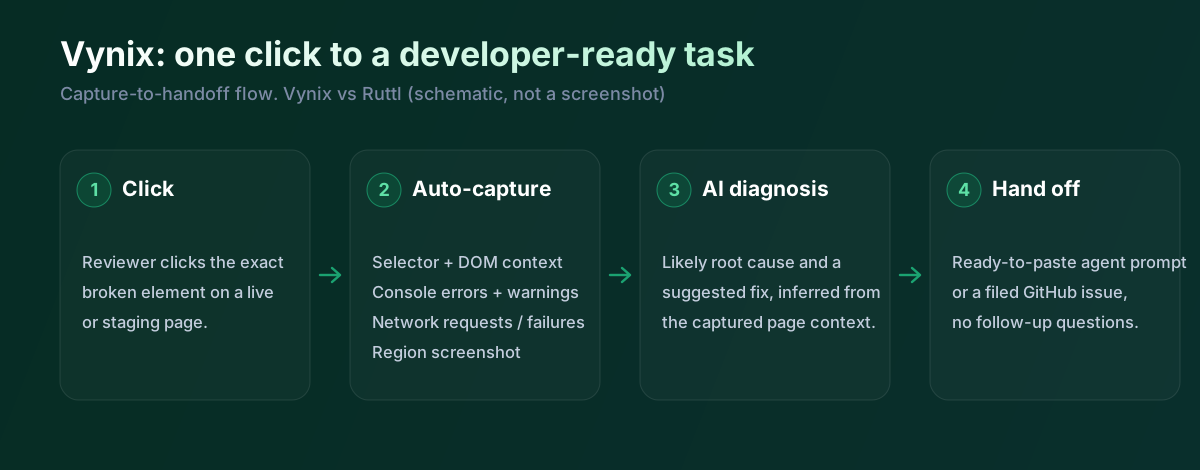
Vynix starts from a different assumption: the person reporting the issue may not know what technical detail the developer needs. A lightweight widget can be dropped onto a site, and the reviewer clicks the incorrect or broken element. Vynix then captures the element, a screenshot, console and network context, and an AI diagnosis of the likely root cause.
That makes Vynix better suited to feedback that needs to become implementation work quickly. Instead of handing a developer a screenshot and a sentence like "this button is broken," Vynix packages the surrounding browser context and provides a ready-to-build prompt or a GitHub issue that can be assigned to a coding agent. It is less about polishing the approval process and more about reducing the gap between a user-visible problem and a developer-ready task.
Developer context and AI diagnosis
For visual review, a screenshot and a pinned comment are often enough. For bug fixing, they frequently are not. Developers may need to know which element was clicked, whether a JavaScript error appeared, whether an API call failed, or whether the problem is likely a styling, state, routing, or backend issue.
This is the area where Vynix is more specialized. It captures browser-level context automatically and adds an AI root-cause diagnosis so the report is not just descriptive, but directional. Ruttl can communicate what the reviewer sees and wants changed, but it is not described as automatically collecting console and network traces or producing an AI explanation of the likely cause.
Team workflow and handoff
Ruttl fits teams that collaborate around presentation, review, and approval. Designers can collect comments on live pages and files, agencies can involve clients, and teams can keep feedback tied to the visual asset being reviewed. That workflow is valuable when the deliverable needs stakeholder alignment before it moves forward.
Vynix also supports team workflow through projects, roles, sharing, and review rounds, but the handoff target is different. Its output is designed to travel into engineering work, including copying a prompt for implementation or opening a GitHub issue and assigning it to a coding agent. If your process already depends on GitHub issues or AI coding agents, Vynix is more directly aligned with that handoff.
Ruttl is a visual and design review tool with a nice live-edit mode, you can nudge CSS, swap an image, tweak text right on the page. For design feedback and client approval that's lovely. For a bug that needs a developer it captures the visual context but not console or network, doesn't diagnose, and doesn't hand off to GitHub or an agent. Vynix does those three things, so the split is design review versus developer handoff.
When Ruttl fits
Ruttl is the better choice when your main need is visual website feedback, design-file annotation, light page edits, and client or stakeholder sign-off. It is especially suitable for agencies and design teams that want a simple review layer rather than a developer diagnostic workflow.
When Vynix fits
Vynix is the better choice when feedback needs to become a developer-ready bug report with element, screenshot, console, network, and AI root-cause context. It is especially useful for product teams that want to hand issues to GitHub or a coding agent with less back-and-forth.
Example: what one Vynix capture contains
Here's what Vynix records on a click. Ruttl captures the visual comment and pins it to the element; Vynix adds the console, the network and a diagnosis.
// One Vynix annotation, captured the moment someone clicks (no repro steps)
{
  element:    { selector: "button.checkout-cta", tag: "button", text: "Place order" },
  page:       { url: "/cart", viewport: "1280x720" },
  console:    ["TypeError: cart.total is undefined (checkout.js:184)"],
  network:    ["POST /api/checkout -> 500 (2,140 ms)"],
  screenshot: "region around the clicked element",
  diagnosis:  "Submit fires before /api/cart settles; guard the handler until totals resolve."
}
On a client project Ruttl is great for gathering design changes and getting sign-off. But when the note is "this button is broken" rather than "make this bigger", the developer needs more than a pin. Vynix captures the element, the console error and the failed request, diagnoses the cause, and opens a GitHub issue with a prompt. Ruttl for review and edits; Vynix for the fix.
Sources and last verified
We checked these ratings against each vendor's own docs on 18 July 2026. Ratings are for what the tool does natively, out of the box. Vynix's own column is checked against its widget and MCP docs. Spot something that's gone stale? Tell us and we'll fix it.
- Ruttl (website feedback, live edit, AI) - ruttl.com
- Ruttl pricing and integrations - ruttl.com/pricing
- Vynix widget capture and MCP handoff - checked against product docs
Frequently asked questions
- Is Ruttl or Vynix better for client website reviews?
- Ruttl is usually the better fit for client reviews because it is built around visual comments, light edits, design-file annotation, and approval workflows. Vynix can collect feedback, but its output is more developer-oriented.
- Can Vynix replace Ruttl for design feedback?
- Not completely. Vynix is useful when design feedback needs developer context or implementation handoff, but Ruttl is stronger for broad visual review, file annotation, and sign-off with nontechnical stakeholders.
- Which tool is better for reporting bugs to developers?
- Vynix is better for developer bug reports because it captures the clicked element, screenshot, console and network context, and an AI diagnosis. Ruttl can communicate what looks wrong, but it is not primarily a diagnostic bug-reporting tool.