Smartlook vs Vynix
Updated
Smartlook and Vynix solve different parts of the product feedback loop. Smartlook is a session replay and product analytics tool for understanding how users move through web and mobile experiences. Vynix is a website annotation and developer-context tool for turning a specific issue on a page into a build-ready handoff. The real choice is whether your team needs behavioral analytics at scale or faster issue capture, diagnosis, and implementation handoff.
At a glance
| Capability | Vynix | Smartlook | Notes |
|---|---|---|---|
| Session recordings | No | Yes | Smartlook records user sessions for web and mobile; Vynix is focused on manual page annotations rather than replaying user visits. |
| Heatmaps | No | Yes | Smartlook offers heatmaps for analyzing interaction patterns; Vynix does not provide heatmap analytics. |
| Event tracking and product analytics | No | Yes | Smartlook tracks product events and behavior trends; Vynix captures issue context for a specific annotated page state. |
| Click-to-annotate any page | Yes | No | Vynix uses a site widget to select the problematic element directly; Smartlook is built around recordings and analytics, not element-level annotation. |
| Automatic developer context | Yes | Partial | Vynix captures the element, screenshot, console, and network context; Smartlook provides behavioral replay context but not the same annotation-centered developer bundle. |
| AI root-cause diagnosis | Yes | No | Smartlook has no AI diagnosis of its own; the only AI on the roadmap lives in a separate Splunk product. Vynix diagnoses the specific issue from its captured context (checked July 2026, per smartlook.com/features). |
| GitHub issue or coding-agent handoff | Yes | Partial | Vynix can create a ready-to-build prompt or GitHub issue for a coding agent; Smartlook can share evidence from sessions but is not centered on agent handoff. |
| Team review and sharing | Yes | Yes | Both tools support team use and sharing, but Vynix ties collaboration to annotation review rounds while Smartlook centers it on analytics and replay findings. |
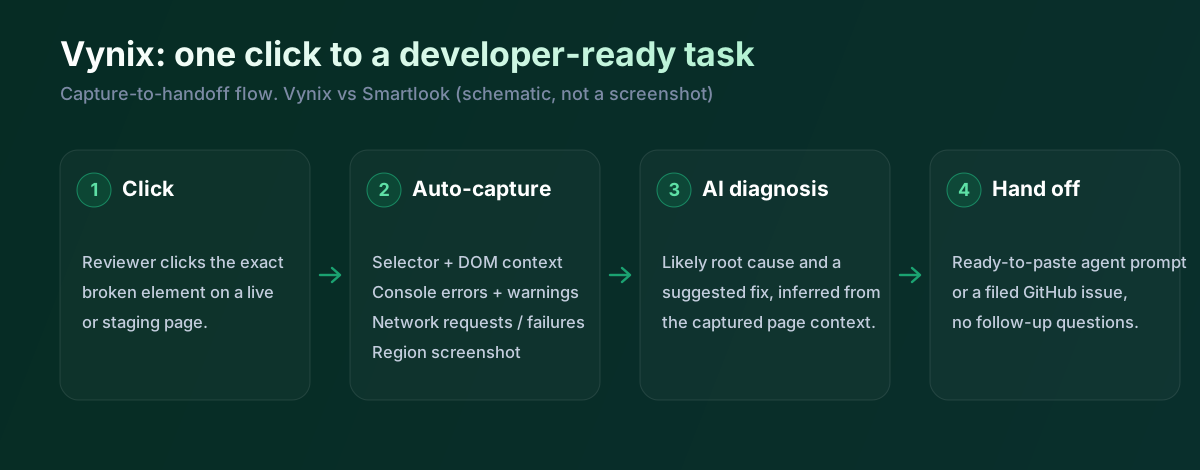
Worth knowing before you weigh this up: Smartlook is being wound down. Its owner has ended new sales and plans to decommission the platform in September 2027, so it isn't something to build a long-term workflow on.
What Smartlook does well
Smartlook is strongest when a team wants to see real user behavior across a product. Its core capabilities include session recordings, heatmaps, and event tracking for web and mobile apps, which makes it useful for finding where users hesitate, abandon flows, or repeatedly interact with the same part of an interface. This is analytics-style visibility: it helps a team understand what happened before deciding what to change.
That makes Smartlook a good fit for product managers, UX researchers, marketers, and support teams that need evidence from real sessions rather than one-off reports. A recording can show the path a user took, while heatmaps and tracked events can show whether the issue is isolated or part of a broader pattern. For conversion work, onboarding analysis, and user journey review, those aggregate views matter.
Smartlook is less focused on turning a single observed issue into a developer-ready task. A replay can show that a button was confusing or that a form failed, but the developer still often needs to inspect the page, reproduce the issue, check console output, and gather network context separately. In that sense, Smartlook is better at discovery than at packaging implementation context.
Where Vynix differs
Vynix starts from a different workflow: someone is already on the page, sees something wrong, and needs to explain it clearly to a builder. Instead of asking that person to write a long bug report, Vynix lets them click the problematic element and captures the page context around that exact issue. The result is closer to a structured implementation note than a general analytics observation.
This is useful for QA teams, founders, designers, product managers, and customer-facing teams who review websites and web apps directly. They can mark a spacing issue, broken interaction, copy problem, or visual defect without switching into a separate replay analysis workflow. Because the annotation is tied to the selected element and screenshot, the report is anchored to the thing that needs attention.
Vynix is not meant to replace session replay for understanding broad user behavior over time. It does not provide heatmaps or event funnels in the way a product analytics tool does. Its value is in shortening the path from a specific observation to a developer or coding agent that can act on it.
Developer context and AI diagnosis
The biggest practical difference is the kind of context each tool collects. Smartlook can show the user journey and provide session-level evidence, which is valuable when the team needs to understand what a user did before an issue appeared. Vynix focuses on implementation context at the moment of annotation, including the selected element, screenshot, console context, network context, and an AI diagnosis of the likely root cause.
That changes the handoff quality. With Smartlook, a developer may receive a recording link and then investigate the codebase, browser tools, and logs to understand why the issue happened. With Vynix, the report is intended to arrive with the technical clues already bundled, so the developer can start closer to the likely fix.
AI diagnosis should still be treated as assistance, not proof. A developer needs to verify the suggested cause, especially for issues involving backend behavior, authentication, third-party scripts, or state that is hard to infer from the browser. The benefit is that Vynix can give the first pass of reasoning and a ready-to-build prompt, reducing the blank-page problem that often follows vague feedback.
Team workflow and handoff
Smartlook fits naturally into a product analytics workflow. Teams review recordings, compare heatmaps, inspect events, and then decide which issues deserve prioritization. The artifact being shared is usually evidence of user behavior, such as a replay, segment, or analytics view.
Vynix is built around the handoff after an issue is identified. It can turn a page annotation into a prompt for implementation or open a GitHub issue that can be assigned to a coding agent. Review rounds, projects, roles, and sharing help keep the feedback cycle focused on whether the issue was fixed, not just whether it was observed.
For teams using both categories, the tools can be complementary. Smartlook can reveal that users are struggling in a checkout or onboarding step, while Vynix can be used during review to mark the exact UI problem and send it to the person or agent responsible for the fix. The choice depends on whether the current bottleneck is finding problems or getting known problems implemented cleanly.
Smartlook is session recording, heatmaps and event analytics, mostly aimed at product teams. It has no click-to-annotate bug widget, no console or network context for a single report, and no AI diagnosis, and it's on the way out. Vynix is a live tool built specifically for the bug-to-fix handoff, so on the rows that matter for that job the two just don't overlap much.
When Smartlook fits
Smartlook is the better choice when you need session recordings, heatmaps, and event analytics to understand user behavior across web or mobile products. It is especially useful when the question is how many users are affected, where they drop off, or what paths they take through a flow.
When Vynix fits
Vynix is the better choice when you already see an issue on a website and want to turn it into a developer-ready task quickly. It is especially useful for teams that need element-level annotations, browser context, AI root-cause suggestions, GitHub issues, and coding-agent handoff.
Example: what one Vynix capture contains
Here's what Vynix captures the moment a reviewer clicks a broken element, the kind of developer context a recording tool doesn't hand over.
// One Vynix annotation, captured the moment someone clicks (no repro steps)
{
  element:    { selector: "button.checkout-cta", tag: "button", text: "Place order" },
  page:       { url: "/cart", viewport: "1280x720" },
  console:    ["TypeError: cart.total is undefined (checkout.js:184)"],
  network:    ["POST /api/checkout -> 500 (2,140 ms)"],
  screenshot: "region around the clicked element",
  diagnosis:  "Submit fires before /api/cart settles; guard the handler until totals resolve."
}
With Smartlook you'd watch a recording to guess what went wrong. With Vynix a reviewer clicks the broken element and you immediately have the selector, the console error, the failed request and a screenshot, plus a diagnosis and a prompt to hand off. Given Smartlook's sunset, that difference matters even more if you're choosing something to rely on.
Sources and last verified
We checked these ratings against each vendor's own docs on 18 July 2026. Ratings are for what the tool does natively, out of the box. Vynix's own column is checked against its widget and MCP docs. Spot something that's gone stale? Tell us and we'll fix it.
- Smartlook features and end-of-sale notice - smartlook.com/features
- Vynix widget capture and MCP handoff - checked against product docs
Frequently asked questions
- Is Smartlook a replacement for Vynix?
- Not usually. Smartlook is better for seeing how users behave across sessions, while Vynix is better for capturing a specific issue on a page with developer context and handing it off for implementation.
- Can Vynix replace session replay?
- No. Vynix does not provide session recordings, heatmaps, or event analytics. It is designed for annotated issue capture and developer handoff after someone has identified a problem.
- Which tool is better for developers?
- Vynix is more developer-oriented because it captures the selected element, screenshot, console and network context, and an AI root-cause diagnosis. Smartlook is still useful to developers when they need to watch user behavior that led to a bug or UX problem.