Userback vs Vynix
Updated
Userback and Vynix both help teams report what is wrong on a live website, but they are built around different end points. Userback is strongest when the goal is collecting annotated screenshots, videos, and user feedback into a triage board. Vynix is designed for a more developer-facing workflow, where a click on a broken element captures technical context and turns it into a build-ready handoff. The practical choice is whether your bottleneck is feedback collection at scale or diagnosing and fixing specific website issues faster.
At a glance
| Capability | Vynix | Userback | Notes |
|---|---|---|---|
| Website feedback widget | Yes | Yes | Both tools can be added to a website so users or team members can submit feedback from the page. |
| Annotated screenshots | Yes | Yes | Userback is known for screenshot annotation, while Vynix captures a screenshot as part of the click-to-annotate flow. |
| Video feedback | No | Yes | Userback supports video feedback; Vynix is described around click annotations, screenshots, and developer context rather than video capture. |
| Clicked element context | Yes | Partial | Vynix captures the element involved in the report; Userback lets users visually mark an area but is not primarily an element-context capture tool. |
| Browser metadata | Yes | Yes | Both can provide useful environment information, such as page and browser context, alongside a report. |
| Console and network context | Yes | Partial | Vynix explicitly captures console and network context for developers; Userback focuses on feedback capture with supporting technical metadata. |
| AI root-cause diagnosis | Yes | No | Userback has AI for auto-categorising and summarising feedback, but not for diagnosing a bug's root cause. That diagnosis step is where Vynix differs (checked July 2026, per userback.io/features). |
| Coding-agent handoff | Yes | Yes | Userback ships a native MCP integration that gives Claude, ChatGPT, Cursor and other assistants full context from a feedback item, including screenshots, console logs and session replays. That's a real coding-agent handoff. Vynix's version writes the prompt for you from the clicked element (checked July 2026, per userback.io/features). |
What Userback does well
Userback is a mature visual feedback tool for product teams, agencies, QA teams, and client-facing web projects. Its core flow is familiar: add a feedback widget, let users mark up a screenshot or record video, and collect the report with useful metadata such as browser, operating system, screen size, and URL. That makes it a good fit when the team needs a low-friction way to gather comments from non-technical users.
The product also gives teams a place to manage the incoming feedback. Userback includes boards and workflow features for reviewing, assigning, and triaging reports, plus integrations commonly used by product and support teams. That matters when feedback is not just a bug report, but a mix of usability comments, design notes, content edits, customer requests, and QA observations.
Userback's strength is breadth in visual feedback capture. Annotated screenshots and video can explain a user problem quickly, especially when the person reporting it cannot describe the technical cause. It is less specialized around capturing the exact front-end element, network activity, and code-level context needed to turn a visual issue directly into an implementation task.
Where Vynix differs
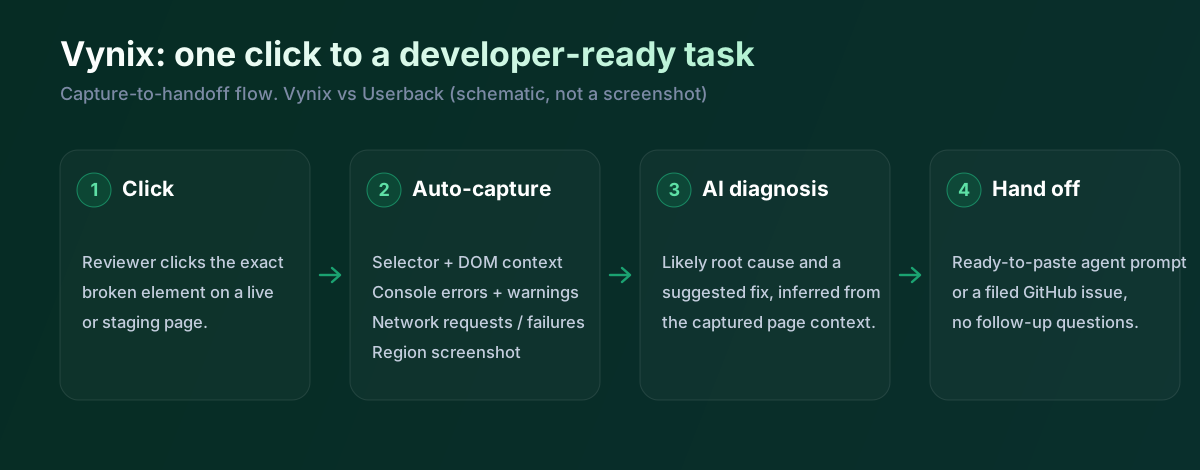
Vynix starts from the same simple action, clicking on something wrong on a page, but it is aimed more directly at engineering follow-through. The widget captures the selected element, a screenshot, console and network context, and an AI diagnosis of the likely root cause. Instead of stopping at a marked-up visual report, Vynix tries to explain why the issue may be happening.
That difference is important for teams using AI coding tools or agent-based development. Vynix can produce a ready-to-build prompt, open a GitHub issue, and assign it to a coding agent. The report is therefore not just evidence for a human triage meeting, but a structured handoff that can move into a development loop.
Vynix is narrower than a general feedback platform in some respects. It is focused on website annotation, developer context, review rounds, projects, roles, and sharing. If a team mainly needs broad user research feedback, video testimonials, or a central inbox for many kinds of customer comments, Userback may feel more complete.
Developer context and AI diagnosis
The biggest technical gap is context capture. Userback gives useful issue-reporting metadata and can help developers understand the environment in which a problem occurred. For many visual bugs, a screenshot, video, URL, browser details, and the user's explanation are enough to reproduce the issue.
Vynix goes further by capturing information closer to what a developer would inspect manually. Element context helps identify the specific part of the page involved, while console and network context can reveal JavaScript errors, failed requests, API responses, or timing problems. This is especially valuable when the screenshot only shows the symptom and the real cause is hidden in the browser runtime.
The AI diagnosis layer is also a meaningful distinction. Vynix uses the captured context to suggest the likely root cause, which can reduce the back-and-forth between QA, product, and engineering. Userback is better understood as a collection and triage system for feedback, not as a tool built primarily to infer the technical cause of a front-end issue.
Team workflow and handoff
Userback is well suited to teams that need an organized feedback intake process. Its board-style workflow, feedback statuses, assignees, and integrations make it practical for managing a stream of reports from customers, clients, testers, or internal stakeholders. The workflow is especially useful when the first job is to decide what is valid, what is a duplicate, and what should become a ticket.
Vynix is built around a shorter path from observed issue to developer action. After an annotation, the captured context can be converted into a prompt or a GitHub issue that is suitable for a coding agent. That is a different kind of workflow: less about operating a broad feedback queue, and more about giving an engineer or AI agent enough information to start fixing.
For teams, the tradeoff is not simply which product has more features. Userback is the stronger choice when many people need to submit rich visual feedback and the product team needs to sort it. Vynix is the stronger choice when the important question after every report is, what code or front-end behavior probably caused this, and how do we hand it off with minimal rewriting?
Userback is a capable feedback tool and it's added a lot lately, screen annotation, video, browser metadata, console and network capture, AI summaries, and a native MCP integration that hands full context to a coding agent. So credit where it's due, it isn't AI-free and it does hand off to agents. The remaining gap is the diagnosis: Userback collects and organises, Vynix reads the captured context and suggests the likely cause before it writes the prompt. If you mostly need to gather and route feedback, Userback is strong; if you want the cause worked out too, that's Vynix.
When Userback fits
Userback is the better choice when you need a flexible visual feedback system for screenshots, videos, customer comments, and product triage across a website. It is especially useful when many non-technical users, clients, or testers need an easy way to report issues without thinking about developer context.
When Vynix fits
Vynix is the better choice when the team wants each website annotation to carry technical context, an AI root-cause diagnosis, and a path into a coding workflow. It fits teams that already use GitHub issues, AI coding agents, or structured developer handoffs to move from report to fix quickly.
Example: what one Vynix capture contains
Here's what Vynix records on a click. Userback captures a lot of the same detail; the extra step in Vynix is the diagnosis line at the bottom.
// One Vynix annotation, captured the moment someone clicks (no repro steps)
{
  element:    { selector: "button.checkout-cta", tag: "button", text: "Place order" },
  page:       { url: "/cart", viewport: "1280x720" },
  console:    ["TypeError: cart.total is undefined (checkout.js:184)"],
  network:    ["POST /api/checkout -> 500 (2,140 ms)"],
  screenshot: "region around the clicked element",
  diagnosis:  "Submit fires before /api/cart settles; guard the handler until totals resolve."
}
A client leaves feedback on a broken button. Userback captures the annotated screenshot, the browser data and, with its SDK, console and network, and can pass it to an agent over MCP. Vynix captures the element and context too, and then diagnoses the likely cause and hands over a prompt. The overlap is real; the difference is whether the cause is worked out for you.
Sources and last verified
We checked these ratings against each vendor's own docs on 18 July 2026. Ratings are for what the tool does natively, out of the box. Vynix's own column is checked against its widget and MCP docs. Spot something that's gone stale? Tell us and we'll fix it.
- Userback features (MCP integration, AI) - userback.io/features
- Userback bug reporting (console and network) - userback.io/use-case/bug-reporting
- Vynix widget capture and MCP handoff - checked against product docs
Frequently asked questions
- Is Userback mainly a bug reporting tool or a feedback tool?
- Userback is best described as a visual feedback and bug reporting tool. It captures annotated screenshots, video feedback, and metadata, then helps teams triage what comes in.
- Can Vynix replace Userback?
- It depends on the workflow. Vynix can replace Userback for teams that mainly need website annotations with developer context, AI diagnosis, and coding handoff, but Userback is broader for collecting visual feedback from users and clients.
- Which tool is better for developers?
- Vynix is more developer-oriented because it captures the clicked element, console and network context, and an AI root-cause diagnosis. Userback is still useful for developers, but its main value is clear visual reporting and triage rather than code-level diagnosis.