Usersnap vs Vynix
Updated
Usersnap and Vynix both help teams capture problems on a website, but they are built for different moments in the feedback loop. Usersnap is a feedback platform for collecting annotated screenshots, surveys, and feature requests from users or internal teams. Vynix is a website annotation and developer-context tool that focuses on turning a clicked page problem into actionable engineering context. The real choice is whether you need a broad feedback collection program or a faster path from visual bug report to developer-ready fix.
At a glance
| Capability | Vynix | Usersnap | Notes |
|---|---|---|---|
| Click-to-annotate page feedback | Yes | Yes | Both tools support visual website feedback with annotated screenshots or page-level comments. |
| Surveys and structured user feedback | No | Yes | Usersnap supports survey-style feedback such as customer satisfaction and product feedback; Vynix is not a survey platform. |
| Feature-request boards | No | Yes | Usersnap includes feature request collection workflows; Vynix focuses on website issue annotation and developer handoff. |
| Automatic developer context | Yes | Partial | Vynix captures element, screenshot, console, and network context; Usersnap captures useful report metadata, but is not centered on full developer context capture. |
| AI root-cause diagnosis | Yes | No | Usersnap has AI for smart labelling, summaries and suggested replies, but not for diagnosing a bug's root cause. Vynix runs that diagnosis from the captured page context (checked July 2026, per usersnap.com/features). |
| Handoff to a coding agent | Yes | No | Vynix can generate a ready-to-build prompt or assign a GitHub issue to a coding agent; Usersnap focuses on feedback intake and workflow. |
| Issue tracker handoff | Yes | Partial | Vynix can open GitHub issues with captured context; Usersnap offers common workflow integrations, but the handoff is not designed around agent-ready implementation context. |
| Team roles, projects, and sharing | Yes | Yes | Both products support collaborative use by teams, with organization and sharing features for collected feedback or reports. |
What Usersnap does well
Usersnap is strongest when a team needs to collect feedback from customers, beta users, QA testers, or internal stakeholders in a structured way. Its visual feedback widget lets people capture and annotate screenshots, while its broader product also supports surveys and feature-request collection. That makes it useful for product teams that want to centralize different types of user input, not just report broken UI.
A typical Usersnap setup fits customer-facing feedback programs well. Teams can ask for NPS, CSAT, or product feedback, collect bug reports with browser details, and organize incoming items for triage. It is less about automatically diagnosing the technical cause of a problem and more about making feedback easier to submit, categorize, and act on across product, support, and engineering.
Usersnap also has the advantage of being a known, established feedback product with integrations into common tools used by product and support teams. For organizations that care about feature request boards, survey workflows, and user-facing feedback channels, that breadth matters more than deep developer telemetry.
Where Vynix differs
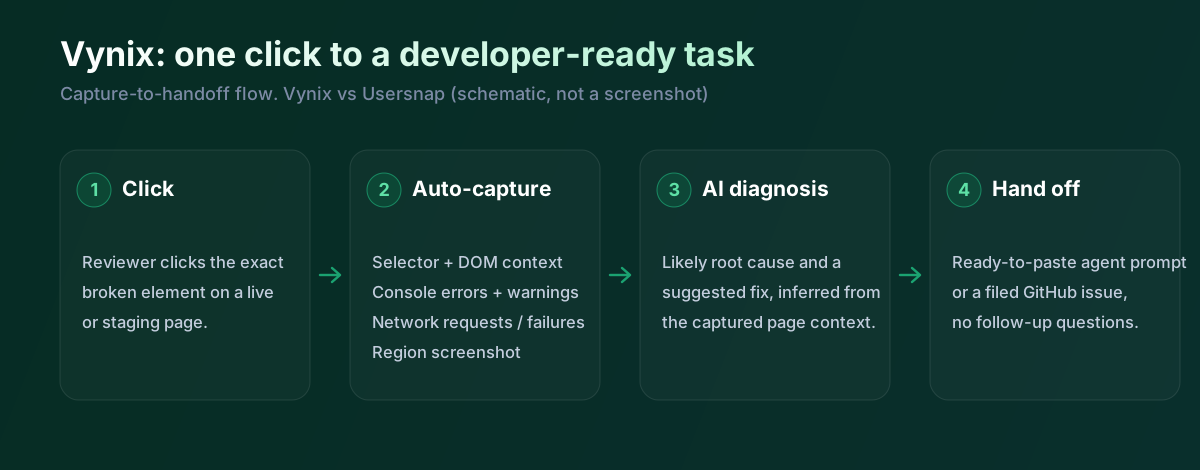
Vynix starts from a narrower but more engineering-focused problem: someone sees something wrong on a website, clicks the exact element, and the tool captures the context a developer would normally have to ask for later. That includes the selected element, a screenshot, console and network context, and an AI diagnosis of the likely root cause. The workflow is designed to reduce the back-and-forth between a reporter and the person fixing the issue.
This makes Vynix a different kind of tool from a general feedback platform. It is not primarily for running customer surveys or collecting feature ideas at scale. Its value is in turning page-level observations into actionable implementation context, especially when the person reporting the issue is not the same person who will fix it.
The difference is clearest in bug triage. In Usersnap, a screenshot and user comment can help a team understand what was seen. In Vynix, the goal is to attach enough technical evidence and AI interpretation that an engineer, or a coding agent, can start work with fewer follow-up questions.
Developer context and AI diagnosis
Usersnap can capture useful diagnostic information such as browser and environment details, and visual screenshots give developers a clear view of what the reporter saw. For many customer-reported bugs, that is enough to reproduce the issue or at least prioritize it. However, Usersnap is not primarily positioned as a tool that analyzes the DOM, console, and network activity to infer a likely root cause.
Vynix is built around that developer context. By capturing the clicked element and related page data, it aims to preserve the technical state of the issue at the moment it was reported. The AI diagnosis is meant to summarize what probably went wrong and provide a more direct starting point for a fix.
That distinction matters for teams using AI coding agents or agent-assisted development. A vague screenshot often still needs translation into implementation instructions. Vynix is designed to package the problem into a prompt or GitHub issue that a developer or coding agent can pick up more directly.
Team workflow and handoff
Usersnap is well suited to teams that need an intake system. Feedback can come from users, stakeholders, or testers, and product teams can organize it alongside surveys and feature requests. That is useful when the main challenge is deciding what feedback matters, grouping similar requests, and keeping a feedback process visible across teams.
Vynix is more focused on the handoff from report to fix. Projects, roles, sharing, and review rounds support collaboration, but the workflow is centered on moving a concrete website issue toward implementation. The ability to copy a ready-to-build prompt or open a GitHub issue and assign it to a coding agent is a key difference from conventional feedback collection.
In practice, the two products may appeal to different owners. Usersnap often fits product, customer success, and support-led feedback programs. Vynix is more likely to appeal to engineering, QA, design review, and AI-development workflows where each report should carry enough technical context to become work quickly.
Usersnap is built to gather feedback across a product, bug reports, surveys, feature-request boards, with AI that labels and summarises it. That breadth is its strength. Vynix is narrower and deeper on one path: it captures the exact element, works out the likely cause, and writes the handoff for a developer or agent. So Usersnap is the better fit if you want one place for all feedback and sentiment; Vynix is the better fit if the priority is turning a website bug into a fixable task fast.
When Usersnap fits
Usersnap is the better choice when you need a mature feedback platform for annotated screenshots, surveys, and feature-request boards across a customer-facing product. It is also a strong fit when product and support teams need to organize broad user input before deciding what engineering should build or fix.
When Vynix fits
Vynix is the better choice when the main goal is to turn a clicked website issue into developer-ready context with screenshot, element, console, network, and AI diagnosis included. It is especially relevant for teams that want to hand issues to developers or coding agents with less manual translation.
Example: what one Vynix capture contains
Here's what Vynix records on a click. Usersnap captures browser info and console errors too; the difference is the diagnosis and the prompt.
// One Vynix annotation, captured the moment someone clicks (no repro steps)
{
  element:    { selector: "button.checkout-cta", tag: "button", text: "Place order" },
  page:       { url: "/cart", viewport: "1280x720" },
  console:    ["TypeError: cart.total is undefined (checkout.js:184)"],
  network:    ["POST /api/checkout -> 500 (2,140 ms)"],
  screenshot: "region around the clicked element",
  diagnosis:  "Submit fires before /api/cart settles; guard the handler until totals resolve."
}
Usersnap is great when you're collecting bug reports and user sentiment together and routing them to Jira or GitHub. Vynix comes in when someone spots a specific issue: they click it, and you get the selector, the console error, the failed request and a screenshot, plus a suggested cause and a prompt. Different centre of gravity, and plenty of teams could use both.
Sources and last verified
We checked these ratings against each vendor's own docs on 18 July 2026. Ratings are for what the tool does natively, out of the box. Vynix's own column is checked against its widget and MCP docs. Spot something that's gone stale? Tell us and we'll fix it.
- Usersnap features (feedback, surveys, AI) - usersnap.com/features
- Vynix widget capture and MCP handoff - checked against product docs
Frequently asked questions
- Is Usersnap mainly a bug reporting tool?
- Usersnap includes visual bug and screenshot feedback, but it is broader than bug reporting. It also supports surveys and feature-request workflows, which makes it a feedback platform for product, support, and customer-facing teams.
- Does Vynix replace a customer feedback platform like Usersnap?
- Not in every case. Vynix is designed for website annotation, developer context, AI diagnosis, and handoff to developers or coding agents, while Usersnap is better for collecting and organizing broad user feedback, surveys, and feature ideas.
- Which tool is better for engineering teams using AI coding agents?
- Vynix is the more direct fit because it packages a clicked issue with technical context and can produce a ready-to-build prompt or GitHub issue. Usersnap can help collect feedback, but it generally leaves more translation work before an agent or developer can start implementing a fix.