Trello vs Vynix
Updated
Trello and Vynix solve different parts of the delivery process. Trello is a flexible project management board for organizing tasks, ideas, bug lists, and lightweight team workflows. Vynix is built around website annotation, developer context capture, and handoff from reported issue to implementation. The real choice is whether your team mainly needs a general task board, or a faster way to turn website feedback into actionable engineering work.
At a glance
| Capability | Vynix | Trello | Notes |
|---|---|---|---|
| General task boards | Partial | Yes | Trello is built around boards, lists, and cards for general work tracking; Vynix has projects and workflow features but is focused on website feedback. |
| Click-to-annotate a live web page | Yes | No | Vynix lets reviewers click what is wrong on a site; Trello cards can contain feedback but do not provide native page annotation. |
| Automatic screenshot and element capture | Yes | No | Vynix captures the relevant page element and screenshot during annotation; Trello relies on users to add screenshots or attachments manually. |
| Console and network context capture | Yes | No | Vynix captures browser developer context such as console and network information; Trello does not inspect the browser session. |
| AI root-cause diagnosis | Yes | No | Trello's AI brainstorms and summarises text; it doesn't diagnose bugs (checked July 2026, per trello.com/tour). |
| GitHub and coding agent handoff | Yes | Partial | Trello's GitHub link is a Power-Up add-on rather than part of the base product, and there's no coding-agent handoff. Vynix opens a GitHub issue and writes an agent prompt natively (checked July 2026, per support.atlassian.com Trello GitHub Power-Up). |
| Review rounds for website changes | Yes | Partial | Vynix includes review rounds for website feedback; Trello can approximate review workflows with lists, comments, and checklists. |
| Team roles, sharing, and collaboration | Yes | Yes | Both support collaboration. Trello provides members, comments, board sharing, and workspace permissions, while Vynix applies roles and sharing to website review projects. |
What Trello does well
Trello is best known for its simple board, list, and card model. A team can create a board for a product, sprint, content calendar, or bug queue, then move cards through stages such as To do, Doing, and Done. The product is approachable because it does not require a strict methodology, and it works well for teams that want a lightweight place to track work without adopting a full issue tracker.
Cards can hold descriptions, comments, checklists, attachments, labels, due dates, and members. Trello also supports templates, automation through Butler, and integrations through Power-Ups, including connections to tools such as Slack, Google Drive, Jira, and GitHub. Those strengths make Trello useful as a shared operational board, especially when the work items are already understood and the team mainly needs visibility and prioritization.
The tradeoff is that Trello is not designed to inspect a live website and collect technical evidence from the browser. If someone reports a broken layout, console error, or confusing UI state, they usually need to write the steps manually, attach screenshots, and add technical details from another tool. Trello can store that information once collected, but it does not create it automatically from the page.
Where Vynix differs
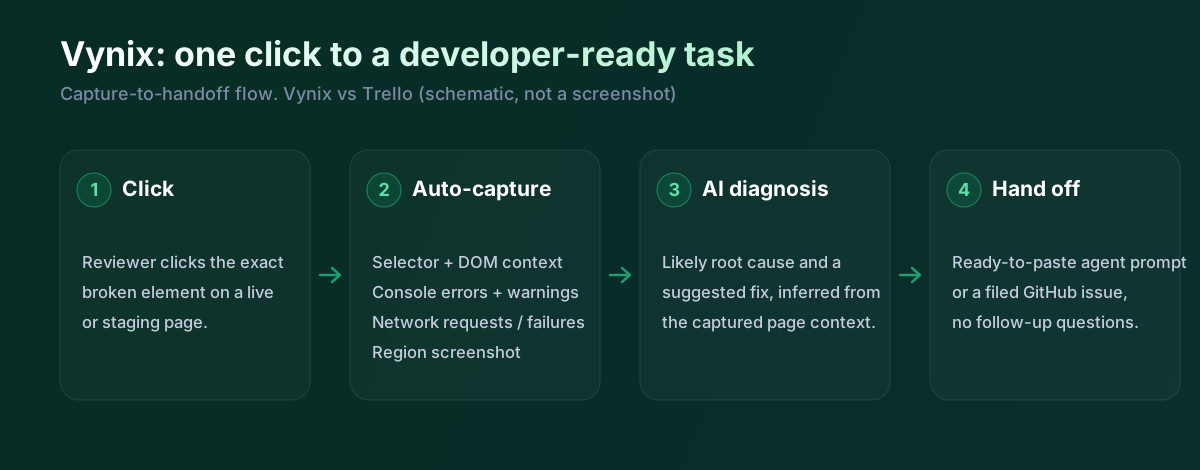
Vynix starts at the point where website feedback happens. After a lightweight widget is added to a site, a reviewer can click the part of the page that looks wrong and create an annotation directly in context. That makes the feedback more precise than a card title such as "button broken" or a screenshot dropped into a generic task.
The important difference is that Vynix captures developer context at the same time as the visual report. It records the selected element, a screenshot, and browser context such as console and network information, then uses that package to produce an AI diagnosis of the likely root cause. This is aimed at reducing the back-and-forth that often happens when a developer has to ask for browser details, reproduction steps, or logs.
Vynix is therefore not a replacement for every Trello board. It is narrower and more technical, focused on website issues, review rounds, and the handoff to people or agents who will make code changes. For teams that already know their workflow but lose time translating page feedback into developer-ready tickets, that narrower focus is the point.
Developer context and AI diagnosis
In Trello, the quality of a bug card depends on what the reporter adds. A careful reporter might include the URL, browser, screenshot, expected behavior, actual behavior, console output, network traces, and steps to reproduce. A busy stakeholder may only write a short note, which leaves the engineering team to reconstruct what happened.
Vynix is designed to make that evidence part of the capture flow. Because the annotation is tied to an element on the page, the report starts with a more specific location and a richer technical record. The AI root-cause diagnosis is not a substitute for engineering review, but it can give developers and coding agents a better starting point than an unstructured comment.
This distinction matters most on websites and web apps where UI defects, broken states, and integration errors are hard to describe in words. Trello can track the resulting work, but it does not natively inspect the browser session. Vynix is built for the diagnostic step before a ticket becomes implementation work.
Team workflow and handoff
Trello gives teams a flexible shared board for planning and accountability. Product managers, marketers, support teams, and small engineering teams can all understand the same card workflow, and Trello's comments, members, labels, and due dates are useful for coordination. If the team needs a general place to manage many kinds of work, Trello is the broader tool.
Vynix focuses the workflow around review rounds, projects, roles, sharing, and developer handoff. Once an issue is captured, the team can copy a ready-to-build prompt or open a GitHub issue and assign it to a coding agent. That is a more specialized path than Trello's general card flow, and it is intended to preserve the technical context gathered from the website.
A practical setup could use both tools, with Vynix collecting and diagnosing website issues while Trello remains the broader planning board. But if the comparison is one tool versus the other, Trello fits general work management better, while Vynix fits teams that want website feedback to arrive with enough context to build against immediately.
Trello is deliberately simple, boards and cards, easy to pick up. That simplicity is the point, and it's also why it doesn't capture website issues, collect console or network data, or diagnose anything. Vynix is the layer in front of a board like this. Someone clicks the broken thing, Vynix captures and diagnoses it, and the card you drop on the board actually has something a developer can use.
When Trello fits
Trello is the better choice when your main need is a simple, general-purpose board for tasks, ideas, lightweight bug lists, or cross-functional planning. It is also a better fit when your team values broad integrations, familiar card workflows, and flexibility over built-in website diagnostics.
When Vynix fits
Vynix is the better choice when the work starts with feedback on a live website and the team needs precise annotations plus developer context. It is especially useful when you want to move from issue capture to GitHub, a ready-to-build prompt, or a coding agent without manually assembling screenshots, logs, and reproduction details.
Example: what one Vynix capture contains
Here's what Vynix records when someone clicks a broken element, the detail a Trello card rarely carries on its own.
// One Vynix annotation, captured the moment someone clicks (no repro steps)
{
  element:    { selector: "button.checkout-cta", tag: "button", text: "Place order" },
  page:       { url: "/cart", viewport: "1280x720" },
  console:    ["TypeError: cart.total is undefined (checkout.js:184)"],
  network:    ["POST /api/checkout -> 500 (2,140 ms)"],
  screenshot: "region around the clicked element",
  diagnosis:  "Submit fires before /api/cart settles; guard the handler until totals resolve."
}
A client leaves a note that a form is broken. As a Trello card that's a sentence and maybe a screenshot. Through Vynix the same click captures the field, the console error and the failed request, diagnoses the likely cause, and hands off, and you can still keep the card on your Trello board. Trello tracks the work; Vynix makes the report worth tracking.
Sources and last verified
We checked these ratings against each vendor's own docs on 18 July 2026. Ratings are for what the tool does natively, out of the box. Vynix's own column is checked against its widget and MCP docs. Spot something that's gone stale? Tell us and we'll fix it.
- Trello tour - trello.com/tour
- Trello GitHub Power-Up - support.atlassian.com/trello/docs/using-the-github-power-up
- Vynix widget capture and MCP handoff - checked against product docs
Frequently asked questions
- Can Trello be used for bug tracking?
- Yes. Many teams use Trello for simple bug lists by creating cards with labels, checklists, comments, attachments, and due dates. It works best when reporters manually provide enough detail, because Trello does not automatically capture page elements, console logs, network context, or an AI diagnosis.
- Is Vynix a project management tool like Trello?
- Not in the same broad sense. Vynix includes projects, roles, sharing, review rounds, and handoff workflows, but its main purpose is website annotation and developer-context capture. Trello is better for general task management across many types of work.
- Should a team use Trello and Vynix together?
- They can complement each other. Vynix can capture and diagnose website issues, then Trello can remain a broader planning board if the team already uses it for prioritization and coordination.