Instabug vs Vynix
Updated
Instabug and Vynix both help teams turn user-visible problems into developer-ready work, but they start in different places. Instabug is built into mobile apps through an SDK, so it is strongest for native app feedback, crashes, device logs, and performance monitoring. Vynix is built for websites, where a reviewer can click the broken element and capture browser context around the issue. The real choice is whether your main problem is closing the loop inside a mobile app or speeding up website QA, review, and developer handoff.
At a glance
| Capability | Vynix | Instabug | Notes |
|---|---|---|---|
| Annotate live websites from the browser | Yes | No | Vynix is built around a website widget and click-to-annotate flow; Instabug is primarily embedded inside mobile apps. |
| Mobile in-app bug reporting | No | Yes | Instabug supports in-app mobile reporting through its SDK, including screenshots and user-supplied annotations. |
| Automatic developer context for web issues | Yes | No | Instabug is now Luciq, and it's built only for mobile apps. For a website issue it captures effectively nothing, so this is a No on the web (checked July 2026, per luciq.ai). |
| Crash reporting and app performance monitoring | No | Yes | Instabug includes mobile crash reporting and performance monitoring; Vynix is not a mobile observability platform. |
| AI root-cause diagnosis | Yes | Partial | Luciq's SmartResolve does real root-cause work and can even open a pull request, but only for mobile apps. On the web it doesn't apply, which is where Vynix runs its diagnosis (checked July 2026, per luciq.ai). |
| GitHub issue and coding-agent handoff | Yes | Partial | Vynix can open a GitHub issue and prepare a ready-to-build prompt; Instabug integrates with development tools but is not centered on coding-agent handoff. |
| Review rounds for web QA and stakeholder feedback | Yes | No | Luciq's feedback flows live inside mobile apps. There's no web QA or stakeholder review-round workflow, so this is a No for websites (checked July 2026, per luciq.ai). |
| Projects, roles, and sharing | Yes | Yes | Both products support team organization and collaboration, though Vynix applies it to website review and Instabug to mobile feedback and observability workflows. |
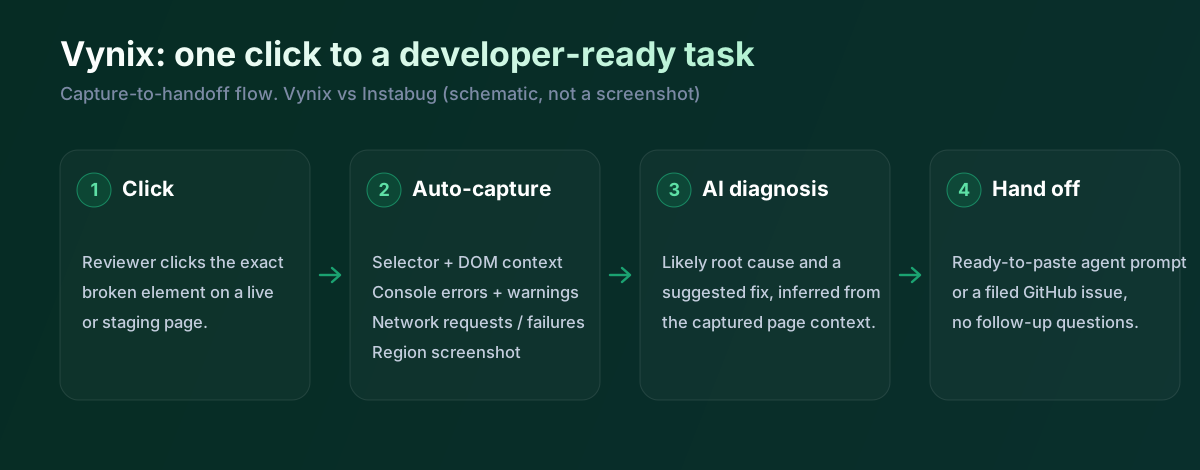
One thing worth flagging up top: Instabug has rebranded to Luciq and now positions itself as observability built exclusively for mobile apps. So while a lot of people still search for "Instabug", the comparison that matters for a website team is really mobile versus web.
What Instabug does well
Instabug is best known as a mobile-first feedback and observability tool. Once its SDK is embedded in an iOS, Android, React Native, Flutter, or similar mobile app, users and testers can report issues from inside the app, commonly with gestures such as shake-to-report, then attach screenshots, annotations, and diagnostic logs.
That in-app position is Instabug's main advantage. It can collect mobile-specific context such as app version, OS version, device details, breadcrumbs, network information when configured, and crash data that would not be available to a normal website annotation tool. For product and engineering teams maintaining consumer or business mobile apps, that context can shorten the back-and-forth with users.
Instabug also goes beyond manual bug reports. Its platform includes crash reporting and app performance monitoring capabilities, which makes it useful for teams that want feedback, stability, and performance signals in one mobile-focused workflow. Vynix is not a mobile crash monitoring product, so this is a clear difference in Instabug's favor for native app teams.
Where Vynix differs
Vynix is designed around the browser and the website review process. Instead of embedding an SDK inside a mobile app, a team drops a lightweight widget onto a site, then reviewers click directly on the part of the page that is wrong. That click becomes the anchor for the report, including the selected element, a screenshot, and page-level context.
This makes Vynix better aligned with website QA, marketing site review, web app acceptance testing, and design-to-development feedback. A stakeholder can point at a broken button, layout issue, copy problem, or unexpected page behavior without writing a long reproduction note. The report is tied to the actual page and element, which is often what developers need first when debugging front-end issues.
Instabug can support feedback workflows, but its natural environment is the mobile app. For a team trying to annotate arbitrary web pages in a browser, capture DOM-adjacent context, and hand the issue to a web developer or coding agent, Vynix is the more purpose-built option.
Developer context and AI diagnosis
The biggest practical gap between a simple screenshot tool and Vynix is developer context. Vynix captures not only what the reviewer clicked, but also the surrounding technical signals such as console output and network context. For web bugs, those details can explain whether the problem is a failed API call, a JavaScript error, a rendering issue, or a missing asset.
Vynix also adds an AI root-cause diagnosis of the likely problem. That does not replace developer verification, but it can give the assignee a faster starting point than a bare screenshot. The value is especially high when the person reporting the issue is non-technical and would not know which browser logs or network requests to include.
Instabug's diagnostic strengths are different. It is strong at mobile runtime context, crash data, device logs, and performance signals. Those are essential for native apps, but they are not the same as clicking a website element and receiving browser-specific context plus a web-oriented diagnosis.
Team workflow and handoff
Instabug is useful when the workflow starts with app users or mobile testers and flows into product, support, and engineering queues. It is commonly used to capture feedback from beta testers and production app users, then route reports into issue trackers or team communication tools. That makes it a good fit for mobile teams that need to close the feedback loop without asking users to leave the app.
Vynix is built around review rounds and web development handoff. A team can organize work into projects, share annotated issues with roles and permissions, and move from a visual report to an implementation-ready next step. Its handoff is especially direct when the team wants to copy a ready-to-build prompt or open a GitHub issue and assign it to a coding agent.
The distinction matters because the receiving developer often needs different information. A mobile engineer needs device, OS, app build, crash, and performance details. A web developer or coding agent often needs the exact page, element, screenshot, console messages, network failures, and a concise explanation of the likely cause.
Luciq's mobile AI is actually good. SmartResolve digs into a crash, finds the cause and can raise a pull request. But it's mobile only, and Vynix is for the browser. If your bug lives on a web page, in a checkout flow, a dashboard, a marketing site, Luciq isn't the tool and Vynix is. That's the whole distinction, and it's why the web-specific rows above come out the way they do.
When Instabug fits
Instabug is the better choice when your product is a native or cross-platform mobile app and you need in-app feedback, crash reporting, device logs, and app performance monitoring. It is also a better fit when reports need to come directly from mobile users or beta testers without leaving the app.
When Vynix fits
Vynix is the better choice when your team reviews websites or web apps and wants to click on the broken element, capture browser context, and hand a developer a clearer starting point. It is especially useful when issues should become GitHub work items or coding-agent tasks with an AI-assisted diagnosis.
Example: what one Vynix capture contains
Here's what Vynix captures the moment someone clicks a broken element in a browser, which is exactly the surface Luciq no longer covers.
// One Vynix annotation, captured the moment someone clicks (no repro steps)
{
  element:    { selector: "button.checkout-cta", tag: "button", text: "Place order" },
  page:       { url: "/cart", viewport: "1280x720" },
  console:    ["TypeError: cart.total is undefined (checkout.js:184)"],
  network:    ["POST /api/checkout -> 500 (2,140 ms)"],
  screenshot: "region around the clicked element",
  diagnosis:  "Submit fires before /api/cart settles; guard the handler until totals resolve."
}
A stakeholder reviewing a staging site clicks a form field that won't accept input. There's no mobile app involved, so Luciq has nothing to capture. Vynix records the element, the console error, the failing request and a screenshot, then writes the developer handoff. For a mobile app you'd still reach for Luciq; for the web, this is where Vynix fits.
Sources and last verified
We checked these ratings against each vendor's own docs on 18 July 2026. Ratings are for what the tool does natively, out of the box. Vynix's own column is checked against its widget and MCP docs. Spot something that's gone stale? Tell us and we'll fix it.
- Luciq (formerly Instabug), mobile-only observability - luciq.ai
- Luciq integrations - docs.luciq.ai/docs/integrations
- Vynix widget capture and MCP handoff - checked against product docs
Frequently asked questions
- Is Instabug a replacement for Vynix on websites?
- Usually no. Instabug is strongest inside mobile apps, where it can collect app, device, crash, and performance data. Vynix is built for annotating websites in the browser and capturing web-specific context such as the clicked element, console output, and network activity.
- Can Vynix replace Instabug for a mobile app?
- No. Vynix is not a mobile SDK for in-app reporting, crash reporting, or app performance monitoring. If you need users to report bugs from inside a native mobile app, Instabug is the more appropriate tool.
- Which tool gives developers more actionable context?
- It depends on the surface being debugged. For mobile apps, Instabug provides the more relevant context, such as device details, logs, crashes, and performance signals. For websites, Vynix provides more targeted front-end context by tying the report to the clicked element, screenshot, console, network data, and AI diagnosis.