MarkUp.io vs Vynix
Updated
MarkUp.io and Vynix both help teams point at something on a website and explain what needs attention, but they are built for different follow-up work. MarkUp.io is a visual collaboration platform for reviewing live websites, images, PDFs, and video, which makes it a strong fit for creative approvals and client feedback. Vynix is focused on website issues that need developer action, capturing technical context and turning a click into a more build-ready handoff. The real choice is whether your feedback loop ends in approval, or whether it needs to move quickly into debugging and implementation.
At a glance
| Capability | Vynix | MarkUp.io | Notes |
|---|---|---|---|
| Annotate live websites | Yes | Yes | Both support visual comments on websites; Vynix does it through its widget, while MarkUp.io is built around visual website review. |
| Review images, PDFs, and video | No | Yes | MarkUp.io supports multiple asset types in one review workflow; Vynix is focused on website annotation and developer handoff. |
| Capture the clicked page element | Yes | Partial | Vynix captures element context for debugging; MarkUp.io pins visual comments but is not designed to collect developer-level element data. |
| Capture console and network context | Yes | No | MarkUp.io pins comments on a page and captures a screenshot, but it doesn't record console or network data. Vynix captures both with each report (checked July 2026, per markup.io). |
| AI root-cause diagnosis | Yes | No | Vynix provides an AI diagnosis of likely causes; MarkUp.io is focused on comments, review, and approvals. |
| Create a GitHub issue or coding-agent handoff | Yes | Partial | Vynix can turn an annotation into a GitHub issue or ready-to-build prompt; MarkUp.io may support workflow handoffs, but not developer-context prompts or coding-agent assignment. |
| Review rounds, projects, roles, and sharing | Yes | Yes | Both support organized collaboration; MarkUp.io emphasizes visual review teams, while Vynix adds this around website issue reporting. |
| Creative and content approval workflow | Partial | Yes | Vynix can support website review rounds, but MarkUp.io is broader for creative approvals across web pages, PDFs, images, and video. |
What MarkUp.io does well
MarkUp.io is strongest when the work being reviewed is visual and cross-format. It supports comments on live websites, images, PDFs, and videos, so a marketing team, agency, or content team can keep feedback on different asset types in one review space. That breadth matters when the same campaign includes a landing page, a PDF sales sheet, product screenshots, and a video cut that all need stakeholder comments.
Its workflow is also oriented around collaboration rather than debugging. Reviewers can point to the exact area they mean, leave comments, and work through approvals without translating everything into a separate email thread or spreadsheet. For teams whose main problem is collecting clear client or stakeholder feedback, MarkUp.io provides a familiar visual review model and does not require the discussion to start from code.
Where Vynix differs
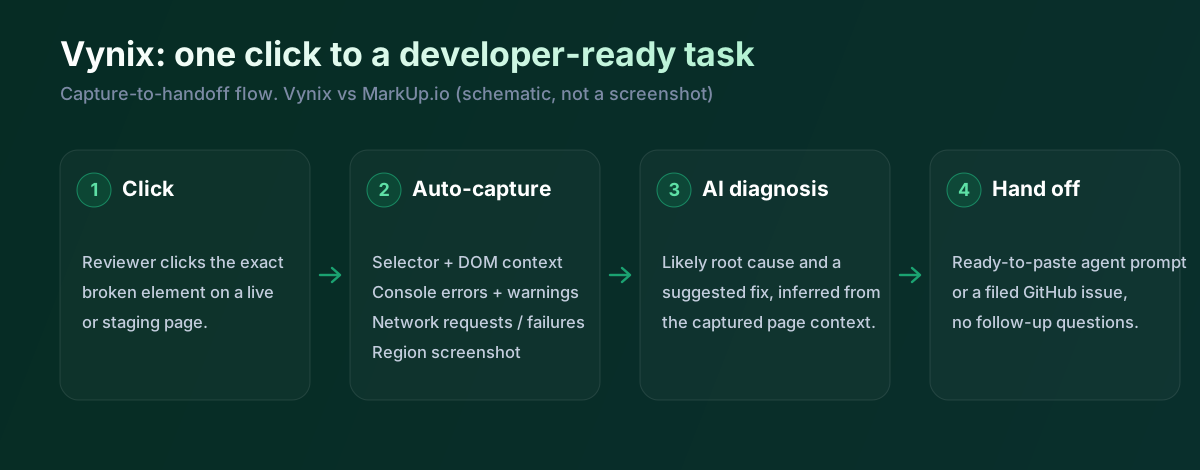
Vynix starts from a narrower problem: a website is wrong, and the person who notices it needs to give engineering enough context to fix it. Instead of treating the annotation as only a visual comment, Vynix captures the clicked element, a screenshot, and the surrounding developer context from the page. That makes the feedback more useful when the next person in the chain is a developer or coding agent rather than an approver.
This difference changes the shape of the workflow. In MarkUp.io, the comment is usually the artifact: a clear note attached to a page or asset. In Vynix, the annotation becomes an evidence bundle for a bug, including technical signals that a non-technical reviewer would rarely collect manually. It is less about reviewing every creative asset type and more about making web QA actionable.
Developer context and AI diagnosis
A common failure in website feedback is that the original report looks obvious to the person who saw it, but thin to the person assigned to fix it. A comment like "button does not work" may need browser details, console errors, failed network requests, and the specific element involved before it becomes actionable. Vynix is designed to collect that context automatically when the issue is annotated, which reduces the back-and-forth usually needed to reproduce or triage a bug.
Vynix also adds an AI diagnosis of the likely root cause. That does not replace engineering judgment, and teams should still verify the result in code, but it can speed up triage by pointing to a likely area of failure. MarkUp.io is not positioned as a developer-context capture or root-cause analysis tool; its value is in making visual feedback clear across many asset types.
Team workflow and handoff
Both products support team collaboration, but they hand work off in different directions. MarkUp.io is well suited to review rounds, client comments, and approval-oriented workflows where feedback needs to be gathered, resolved, and signed off. It is especially practical when reviewers include non-technical stakeholders who need a simple way to comment on a live page, PDF, image, or video.
Vynix is more specialized for the path from issue discovery to implementation. After capturing a problem, it can produce a ready-to-build prompt or open a GitHub issue and assign it to a coding agent. That makes it a better fit for product teams, QA teams, and founders who want website feedback to become structured engineering work without manually writing reproduction notes, collecting console logs, and formatting tickets.
MarkUp.io is really a creative and content review tool. It's great for annotating websites, images, PDFs and video and getting sign-off, and it does that across a lot of file types. What it doesn't do is capture the developer context, no console, no network, no diagnosis, and it has no AI. Vynix is aimed at the engineering handoff instead. So if your job is approvals on creative work, MarkUp.io fits; if it's getting a website bug into a developer's hands, that's Vynix.
When MarkUp.io fits
MarkUp.io is the better choice when your team reviews many kinds of creative assets, including websites, images, PDFs, and video. It is also a strong fit for agencies and marketing teams that need clear visual comments and approvals more than technical debugging data.
When Vynix fits
Vynix is the better choice when website feedback needs to become developer-ready work with screenshots, element context, console and network data, and an AI root-cause diagnosis. It is especially useful when your workflow continues into GitHub issues, coding agents, or engineering implementation.
Example: what one Vynix capture contains
Here's what Vynix records on a click. MarkUp.io captures the visual comment and a screenshot; Vynix adds the console, the network and a diagnosis.
// One Vynix annotation, captured the moment someone clicks (no repro steps)
{
  element:    { selector: "button.checkout-cta", tag: "button", text: "Place order" },
  page:       { url: "/cart", viewport: "1280x720" },
  console:    ["TypeError: cart.total is undefined (checkout.js:184)"],
  network:    ["POST /api/checkout -> 500 (2,140 ms)"],
  screenshot: "region around the clicked element",
  diagnosis:  "Submit fires before /api/cart settles; guard the handler until totals resolve."
}
A team reviewing a landing page design will like MarkUp.io: pin a comment, tag a teammate, get approval. But when the issue is a broken interaction rather than a design note, MarkUp.io has nothing for the developer. Vynix captures the element, the console error and the failed request, then writes the handoff. One is for approving creative work, the other for fixing code.
Sources and last verified
We checked these ratings against each vendor's own docs on 18 July 2026. Ratings are for what the tool does natively, out of the box. Vynix's own column is checked against its widget and MCP docs. Spot something that's gone stale? Tell us and we'll fix it.
- MarkUp.io (creative and website review) - markup.io
- MarkUp.io workflows and integrations - markup.io/blog/markup-io-workflows
- Vynix widget capture and MCP handoff - checked against product docs
Frequently asked questions
- Is MarkUp.io a replacement for a developer debugging tool?
- Not usually. MarkUp.io is best understood as a visual collaboration and approval tool for websites and creative assets. It helps reviewers point out what they see, but it is not designed to automatically capture console logs, network activity, element context, or AI root-cause analysis.
- Can Vynix replace MarkUp.io for client reviews?
- It depends on what the client is reviewing. If the review is mainly about problems on a website that need engineering action, Vynix is a better fit. If the client needs to review PDFs, images, videos, and general creative work, MarkUp.io is the more complete review platform.
- Which tool is better for website QA?
- Vynix is stronger for website QA that needs to move into development because it captures the clicked element, screenshot, console and network context, and an AI diagnosis. MarkUp.io can collect clear website comments, but its main strength is visual feedback and approval rather than technical triage.