Pastel vs Vynix
Updated
Pastel and Vynix both help teams point at a website and explain what needs attention, but they are built for different parts of the workflow. Pastel is a visual feedback tool for collecting sticky-note style comments on live websites and mockups in a shared review view. Vynix is aimed at turning a website issue into developer-ready context, including the clicked element, screenshot, console and network details, and an AI diagnosis. The practical choice is whether your team mainly needs clearer review comments or faster issue reproduction and handoff to engineering.
At a glance
| Capability | Vynix | Pastel | Notes |
|---|---|---|---|
| Click-to-annotate live websites | Yes | Yes | Both tools let reviewers click on a live page and attach feedback, though Vynix treats the click as a technical bug capture point. |
| Sticky-note style visual review | Partial | Yes | Pastel is built around shared visual comments; Vynix supports annotation but is more focused on developer context and handoff. |
| Mockup feedback | Partial | Yes | Pastel supports feedback on mockups as well as live websites; Vynix is primarily described as a widget for annotating sites. |
| Automatic element and screenshot capture | Yes | Yes | Pastel pins each comment to a specific element and automatically records a screenshot plus browser and screen details, so element and screenshot capture is a Yes. What it doesn't grab is console or network data (checked July 2026, per usepastel.com/website-annotation-tool). |
| Console and network context | Yes | No | Vynix captures browser console and network context; Pastel is built for review comments rather than technical debugging data. |
| AI root-cause diagnosis | Yes | No | Pastel has no AI diagnosis. Vynix reads the captured context and suggests a likely cause (checked July 2026, per usepastel.com/features). |
| GitHub issue or coding-agent handoff | Yes | No | Vynix can turn captured context into a ready-to-build prompt or GitHub issue for a coding agent; Pastel is oriented around feedback collection. |
| Review rounds, projects, roles, and sharing | Yes | Yes | Both products support collaborative review workflows, but Pastel emphasizes stakeholder feedback while Vynix emphasizes technical resolution. |
What Pastel does well
Pastel is strongest when the job is to gather clear visual feedback from clients, marketers, designers, and other reviewers. Its sticky-note style comments make the review process easy to understand: open the page or mockup, click the area in question, and leave feedback in a shared view. That is especially useful for content changes, design polish, layout feedback, and approval rounds where the main problem is keeping everyone aligned.
Pastel is also lightweight by design. Teams do not need to turn every comment into an engineering ticket before discussing whether the feedback is valid. For agencies, freelance designers, and web teams that manage client review cycles, this simplicity is often the point: it reduces long email threads and keeps comments attached to the thing being discussed.
The tradeoff is that Pastel is not primarily a debugging tool. A comment can tell an engineer what a reviewer saw, but it is not designed to automatically package the browser console, failed network requests, DOM element details, or a likely technical root cause. If the problem is visual or editorial, that may not matter; if the problem is intermittent, JavaScript-related, or environment-specific, the missing context can slow down reproduction.
Where Vynix differs
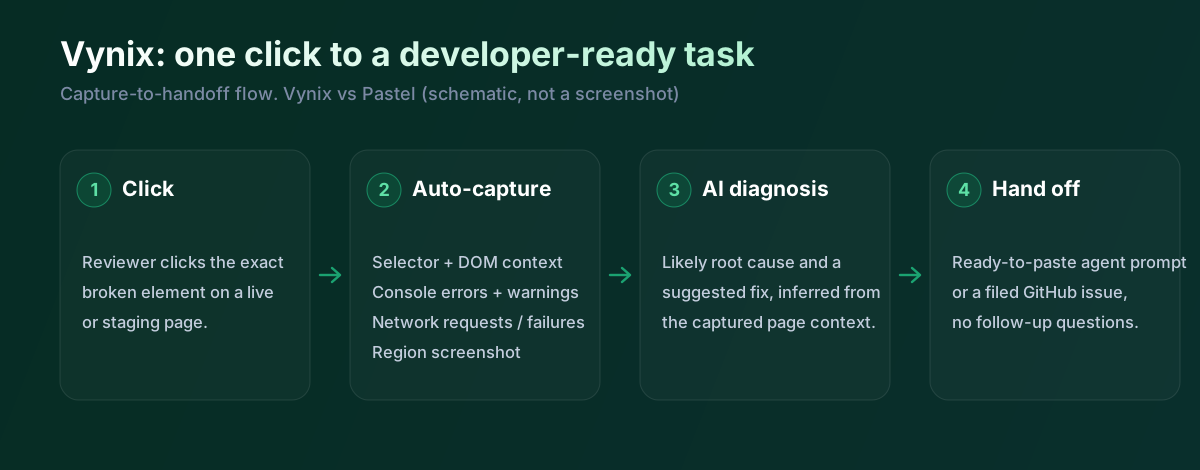
Vynix starts from the same familiar action, clicking on something wrong on a website, but it treats that click as the beginning of a developer handoff. The widget captures the selected element, a screenshot, and surrounding technical context so the report is more than a note on a page. That makes it better suited to bugs where the developer needs to know what happened in the browser, not just what someone observed.
This difference matters when feedback moves from a reviewer to an engineer or coding agent. A vague note like "button does not work" often creates a follow-up loop: what browser, what URL, what console error, what request failed, what component was clicked. Vynix is built to reduce that loop by collecting much of that information at the moment of annotation.
Vynix is less of a pure mockup review product than Pastel. If the team mainly wants to discuss design comps, copy, or visual approvals with non-technical stakeholders, Pastel's simpler review model may be a better fit. If the team is annotating real application behavior that needs to be fixed in code, Vynix's developer context becomes the main advantage.
Developer context and AI diagnosis
The biggest functional gap is the technical capture layer. Vynix is described as capturing the element that was clicked, a screenshot, console context, network context, and an AI diagnosis of the likely root cause. That information can help an engineer quickly distinguish between a styling issue, a JavaScript error, a failed API request, or a state problem that only appears in a specific path.
Pastel's feedback model is intentionally more general. It helps people leave comments on live websites and mockups, but it is built for collecting feedback rather than automatically assembling diagnostic data. That means it can be excellent for saying what should change, while still requiring a developer or QA person to investigate why something is broken.
AI diagnosis is also a different kind of feature from commenting. In Vynix, the diagnosis is meant to convert captured browser context into a likely explanation and a starting point for a fix. Pastel does not position itself as a root-cause analysis tool, so teams using Pastel for bugs should expect a more manual triage process.
Team workflow and handoff
Pastel fits well into review rounds where multiple stakeholders need to leave, resolve, and discuss comments. The value is a shared source of truth for feedback, especially when comments would otherwise be scattered across screenshots, email, chat, and project-management notes. For client-facing teams, the lower technical barrier can be more important than deep engineering metadata.
Vynix is more opinionated about the next step after feedback is collected. From an annotation, a team can copy a ready-to-build prompt or open a GitHub issue and assign it to a coding agent. That makes the handoff more direct for teams using AI-assisted development, issue queues, or agent-based implementation workflows.
Both tools can support collaboration, but the center of gravity is different. Pastel organizes review feedback so teams can decide what should change. Vynix organizes actionable bug context so someone, human or agent, can start fixing it with less back-and-forth.
Pastel is genuinely good at pinned visual review and sign-off, on live sites and on mockups, and it captures the element and a screenshot automatically. Credit where it's due, and we've marked that row up. The gap for engineering is the rest of the context: no console, no network, no diagnosis, and no GitHub or coding-agent handoff. Vynix covers that side. So Pastel is the better fit for approvals and design feedback; Vynix is the better fit when a bug needs to reach a developer.
When Pastel fits
Pastel is the better choice when your main need is fast, low-friction visual feedback on live websites and mockups from clients or non-technical reviewers. It is also a good fit for agencies and design teams that care more about review rounds and approvals than automatic debugging context.
When Vynix fits
Vynix is the better choice when website annotations need to become developer-ready fixes, especially for bugs involving JavaScript errors, failed requests, or hard-to-reproduce UI behavior. It is also a stronger fit for teams that want to turn a report into a GitHub issue, prompt, or coding-agent task with technical context already attached.
Example: what one Vynix capture contains
Here's what Vynix records on a click. Pastel captures the element and a screenshot too; the extra bits here are the console, the network and the diagnosis.
// One Vynix annotation, captured the moment someone clicks (no repro steps)
{
  element:    { selector: "button.checkout-cta", tag: "button", text: "Place order" },
  page:       { url: "/cart", viewport: "1280x720" },
  console:    ["TypeError: cart.total is undefined (checkout.js:184)"],
  network:    ["POST /api/checkout -> 500 (2,140 ms)"],
  screenshot: "region around the clicked element",
  diagnosis:  "Submit fires before /api/cart settles; guard the handler until totals resolve."
}
A client marks up a landing page in Pastel and it's a smooth review, comments pinned right on the elements. When one of those comments is actually a bug, though, the developer still needs more. Vynix captures the element, the console error and the failed request, diagnoses the likely cause, and writes the handoff. Pastel gets the feedback and the sign-off; Vynix gets the bug fixed.
Sources and last verified
We checked these ratings against each vendor's own docs on 18 July 2026. Ratings are for what the tool does natively, out of the box. Vynix's own column is checked against its widget and MCP docs. Spot something that's gone stale? Tell us and we'll fix it.
- Pastel features - usepastel.com/features
- Pastel website annotation (element + screenshot capture) - usepastel.com/website-annotation-tool
- Vynix widget capture and MCP handoff - checked against product docs
Frequently asked questions
- Is Pastel more suitable for client feedback than Vynix?
- Often, yes. Pastel is designed for lightweight visual review, so it works well when clients or stakeholders need to leave comments on live websites or mockups without thinking about technical details.
- Does Vynix replace a visual feedback tool like Pastel?
- Not in every case. Vynix can collect page annotations, but its main strength is capturing developer context and creating a path to a fix, while Pastel is more focused on shared review comments and approval-style feedback.
- Which tool is better for bugs that engineers need to fix?
- Vynix is better suited to engineering bugs because it captures the element, screenshot, console and network context, and an AI root-cause diagnosis. Pastel can show where feedback was left, but engineers may still need to manually reproduce and investigate the underlying issue.